In Strategy 9.4.x-10.x, it is possible to setup a system to automate creating, importing and undoing Packages for Object Manager entirely from command line. This involves use of the command line projectmerge utility and xml configuration files.
Creating a package is already covered under KB34262. This gives the steps to create an xml file using an Object Manager container package. The workaround from KB43711 must be used to allow for use of undo packages.
To create an XML file to use to import the package and create the undo package the Object Manager GUI must be used but this is only for creation of the XML file. The steps for this are below.
1. Start the normal import package dialog in Object Manager
2. Choose both import and create undo package
3. Choose the option to only create the XML file as seen below.
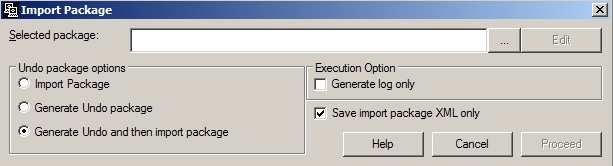
4. Select a test package to import
5. Proceed which will create an XML file.
Once this XML file is created it can be used with the same Project Merge command line utility as used to create the package. The same steps can be used with the undo package as the selected package to create an XML file for importing the undo package. Both of these files must be modified to point to the correct package names and to have their options changed from keepboth to replace per KB43711 like above.
This leads to three XML files. The first file creates a package, the second imports the package and creates an undo package, the third imports the undo package. Each can be called from command line Project merge with the following syntax
Projectmerge -fXMLfilename.xml
