EducationSoftwareStrategy.com
StrategyCommunity

Knowledge Base

Product

Community

Knowledge Base

TopicsBrowse ArticlesDeveloper Zone

Product

Download SoftwareProduct DocumentationSecurity Hub

Education

Tutorial VideosSolution GalleryEducation courses

Community

GuidelinesGrandmastersEvents
x_social-icon_white.svglinkedin_social-icon_white.svg
Strategy logoCommunity

© Strategy Inc. All Rights Reserved.

LegalTerms of UsePrivacy Policy
  1. Home
  2. Topics

KB43721: "ServiceManager: XML syntax error.You do not have Write access to the Filter object" error message appears when executing a prompted report that uses a report filter embedded in a filter in MicroStrategy Web 9.3.1


Community Admin

• Strategy


"ServiceManager: XML syntax error.You do not have Write access to the Filter object" error message appears when executing a prompted report that uses a report filter embedded in a filter in MicroStrategy Web 9.3.1

SYMPTOM:
 
In Strategy Web 9.3.1 users receive the error shown below when running a report that includes a prompt containing a report filter and do not have "Modify" ACLs for the filter objects.  However, this error does not occur for the same user when running the report in Strategy Desktop 9.3.1. 
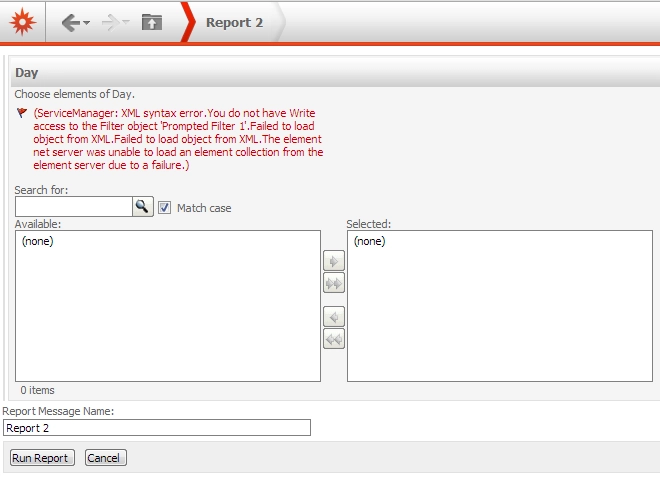
 

ka04W000000Oh6tQAC_0EM4400000026eP.png


(ServiceManager: XML syntax error.You do not have Write access to the Filter object '';.Failed to load object from XML.Failed to load object from XML.The element net server was unable to load an element collection from the element server due to a failure.)

 
STEPS TO REPRODUCE:
Steps to reproduce this issue in the Strategy Tutorial project is as follows:

  1. Create a filter based on an attribute qualification prompt on Day.
  2. Use a predefined list of the first 10 elements.
  3. Name this filter as Prompted Filter 1.
  4. Create a report with Day in the row and Prompted Filter 1 in the report filter.
  5. Save it as Report 1.
  6. Create a second filter with a shortcut to Report 1.
  7. Name it Filter 2.
  8. Create a third filter based on an attribute qualification prompt on Day.
  9. Use Filter 2 to filter the prompt.
  10. Name it Prompted Filter 3.
  11. Create a report with Day in the row and Prompted Filter 3 in the report filter.
  12. Save it as Report 2.
  13. Make sure all objects created in the previous steps have the following ACLs: "View" access for Everyone, "Full control" for Administrator.

Note: These are the default ACL settings.

  • Log into Strategy Web 9.3.1 as a non-Administrator user that only has view access to the objects.
  • Execute Report 2.
  • When answering the prompt, choose the first three dates.
  • Run the report. The error should appear.
  • Run the same report with the same user in Strategy Desktop.

 
Notice that it runs fine without error.
Note: The administrator or any user with Write access to the related objects will be able to execute the report successfully. 
 
CAUSE:
This is a known issue with Strategy Web 9.3.1 due to an unnecessary access check when loading the definition of the prompt object from the XML. A user who does not have Write access to the related objects will receive the error when executing the report.
 
ACTION:
This issue has been addressed in Strategy 9.4.0. Upgrade to this version to take advantage of this fix.
 
WORKAROUND:
The following workarounds can be used to avoid this error:
1. Give Modify Access Control List capabilities to the user(s) or user group(s) experiencing this error for the objects created above.
2. Remove the report being used as a filter and bypass it completely.


Comment

0 comments

Details

Knowledge Article

Published:

June 2, 2017

Last Updated:

June 2, 2017