EducationSoftwareStrategy.com
StrategyCommunity

Knowledge Base

Product

Community

Knowledge Base

TopicsBrowse ArticlesDeveloper Zone

Product

Download SoftwareProduct DocumentationSecurity Hub

Education

Tutorial VideosSolution GalleryEducation courses

Community

GuidelinesGrandmastersEvents
x_social-icon_white.svglinkedin_social-icon_white.svg
Strategy logoCommunity

© Strategy Inc. All Rights Reserved.

LegalTerms of UsePrivacy Policy
  1. Home
  2. Topics

KB4374: Are transformation tables needed to create transformation attributes/metrics in MicroStrategy?


Community Admin

• Strategy


This knowledge base article answers whether transformation tables are needed to create transformation attributes/metrics in MicroStrategy.

No.
Transformation tables can certainly be used if they exist in the database.
Alternatively, a transformation based on expression can be created.
 
To create a 'Last Year' transformation, for example, follow the steps below:
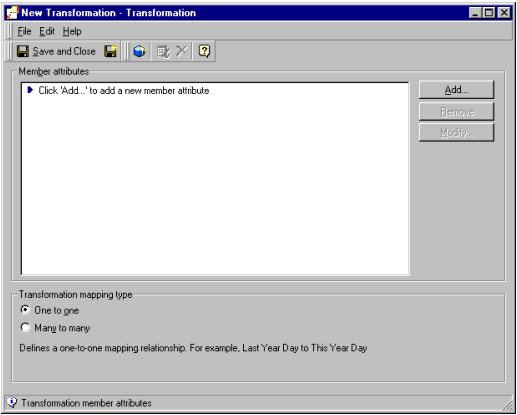
  • Create a new attribute by selecting File > New > Transformation. The following window appears:
ka04W000000OahoQAC_0EM440000002GJT.gif
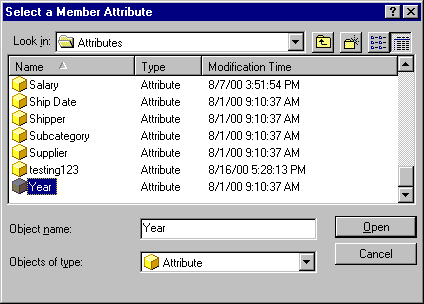
  • Click on 'Add' and select the attribute to which the transformation will apply, such as 'Year.'
ka04W000000OahoQAC_0EM440000002GJW.gif
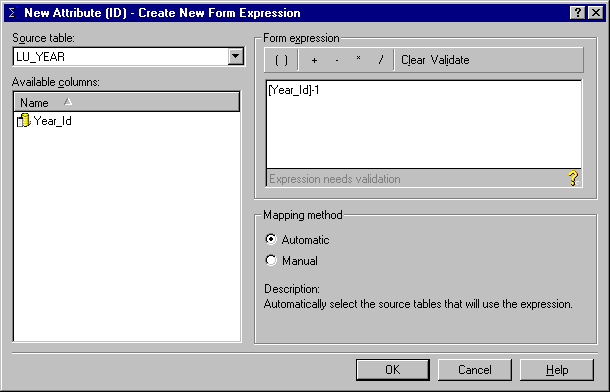
  • Double-click on 'Year_Id' to move it to the Form expression window. Add a '-1' using the operators in that section.
ka04W000000OahoQAC_0EM440000002GJV.gif
  • Click on 'OK' once to close this window. Select 'Save and Close.'

A transformation for 'Last Year' now exists, which can be used to create a 'Last Year - This Year' sales report.
KB4374


Comment

0 comments

Details

Knowledge Article

Published:

April 12, 2017

Last Updated:

December 4, 2018