EducationSoftwareStrategy.com
StrategyCommunity

Knowledge Base

Product

Community

Knowledge Base

TopicsBrowse ArticlesDeveloper Zone

Product

Download SoftwareProduct DocumentationSecurity Hub

Education

Tutorial VideosSolution GalleryEducation courses

Community

GuidelinesGrandmastersEvents
x_social-icon_white.svglinkedin_social-icon_white.svg
Strategy logoCommunity

© Strategy Inc. All Rights Reserved.

LegalTerms of UsePrivacy Policy
  1. Home
  2. Topics

KB43747: "You do not have enough privileges to write files in the provided path. Please ask your administrator for the proper privileges or choose a different log file path" error message when duplicating a project in 9.3.1 as a non local administrator us


Stefan Zepeda

Salesforce Solutions Architect • Strategy


SYMPTOM:
 
When a user tries to perform a project duplication in Strategy 9.3.1 as a non administrator user on the local machine, the user gets the error message below:
 

ka02R000000kWzGQAU_0EM440000002CmL.png


You do not have enough privileges to write files in the provided path. Please ask your administrator for the proper privileges or choose a different log file path.

This error occurs even if the user is a member of the administrators group on the local machine.
 
STEPS TO REPRODUCE:
1. Log into the machine as a non-administrator user on the machine
2. Log into Desktop 9.3.1 as the administrator user in Strategy
3. Right click a project and select Duplicate Project
4. Choose a Source Project Source and Source Project as well as a Destination Project Source and Destination Project
5. In the Log Options screen, leave the default log locations and select Next


ka02R000000kWzGQAU_0EM440000002CmH.png

 
6. Select Finish in the Project Duplication - Summary window
7. The error above is shown
 
 
CAUSE:
This is a known issue in Strategy 9.3.1
 
 
WORKAROUND:
There are two possible workarounds:
 
1. When opening Desktop, right click the Desktop Icon and select run as administrator as seen below. This will allow the project to duplicate successfully with logging enabled.
 

ka02R000000kWzGQAU_0EM440000002CmF.png

 
2. Disable logging in Project Duplication as seen below. This will allow the project to duplicate but there will be no logs generated.
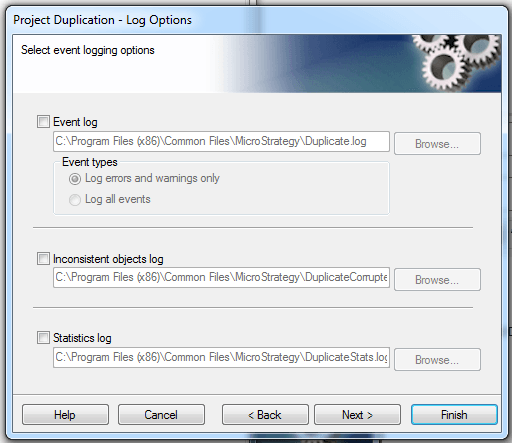
 

ka02R000000kWzGQAU_0EM440000002CmJ.png

ACTION:
Contact Strategy Technical Support for an update on this issue


Comment

0 comments

Details

Knowledge Article

Published:

April 12, 2017

Last Updated:

April 12, 2017