EducationSoftwareStrategy.com
StrategyCommunity

Knowledge Base

Product

Community

Knowledge Base

TopicsBrowse ArticlesDeveloper Zone

Product

Download SoftwareProduct DocumentationSecurity Hub

Education

Tutorial VideosSolution GalleryEducation courses

Community

GuidelinesGrandmastersEvents
x_social-icon_white.svglinkedin_social-icon_white.svg
Strategy logoCommunity

© Strategy Inc. All Rights Reserved.

LegalTerms of UsePrivacy Policy
  1. Home
  2. Topics

KB43768: How to prevent users from creating project sources in MicroStrategy 10.x


Stefan Zepeda

Salesforce Solutions Architect • Strategy


Imagine there are several different Strategy Intelligence Server deployments and versions available in the company network, and users can create project sources from their own machines to such Intelligence Server deployments. In such situations there may be version configurations that are not supported and could cause product issues. Therefore it may be beneficial to prevent Developer users from creating project sources.
 
To prevent users from creating project sources follow the steps below:
  • Go to the following registry path:
    For a 64-bit machine, HKEY_LOCAL_MACHINE\SOFTWARE\Wow6432Node\MicroStrategy\Data Sources
    For a 32-bit machine, HKEY_LOCAL_MACHINE\SOFTWARE\MicroStrategy\Data Sources
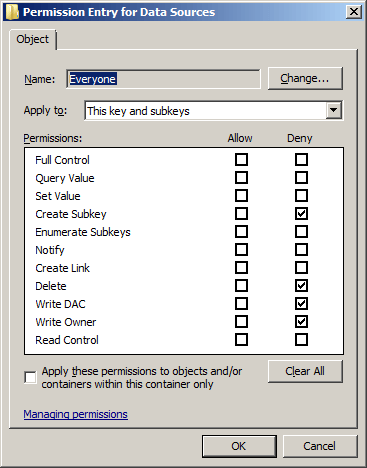
  • Right mouse click on Data Sources key and select permission
  • Add deny ACL or Everyone for write access, as shown below:
ka02R000000kbznQAA_0EM440000002Cmu.png
  • Click OK to save the changes

After above steps users will see the following error message when creating project sources:

ka02R000000kbznQAA_0EM440000002Cmp.png

Sample Code/Error
You do not have read/write privileges on HKEY_LOCAL_MACHINE\SOFTWARE branch of your registry.
 
 
Registry Modification:
WARNING:
 
Modifying registry values incorrectly may cause serious, system-wide problems that may require the re-installation of Microsoft Windows NT/2000. Any edit of the registry is done at the user's own risk. Since these are user-initiated changes, they are not covered by any Strategy warranty. If using Microsoft Windows NT/2000, the user should backup the registry and/or update an Emergency Repair Disk (ERD) prior to alterations.


Comment

0 comments

Details

Knowledge Article

Published:

June 2, 2017

Last Updated:

June 2, 2017