EducationSoftwareStrategy.com
StrategyCommunity

Knowledge Base

Product

Community

Knowledge Base

TopicsBrowse ArticlesDeveloper Zone

Product

Download SoftwareProduct DocumentationSecurity Hub

Education

Tutorial VideosSolution GalleryEducation courses

Community

GuidelinesGrandmastersEvents
x_social-icon_white.svglinkedin_social-icon_white.svg
Strategy logoCommunity

© Strategy Inc. All Rights Reserved.

LegalTerms of UsePrivacy Policy
  1. Home
  2. Topics

KB43780: "SQLEngine got an Exception from DFC: [DFCENGINE] Engine Logic..." error appears when browsing for an attribute elements in MicroStrategy


Stefan Zepeda

Salesforce Solutions Architect • Strategy


This article describes an issue that can happen when browsing attribute elements in MicroStrategy against partial MDX mapped attributes

SYMPTOM:
When browsing elements for a certain attribute under Data Explorer, the following error appears in Strategy Developer:

ka02R000000kcVTQAY_0EM440000002ClC.png


SQLEngine got an Exception from DFC: Engine Logic: HDA-MDX error due to one of the following reasons: (1) A hierarchy on the template must be related to one or more attributes in the report filter, or it cannot be replaced by one (or multiple) attributes. (2) A global attribute is missing the default lookup table or local attribute is missing its source table. (3) Local Attributes from more than one MDX SourceTable is not supported yet!
 
This issue occurs when browsing through the elements of a relational attribute that has been mapped to MDX databases.
 
CAUSE:
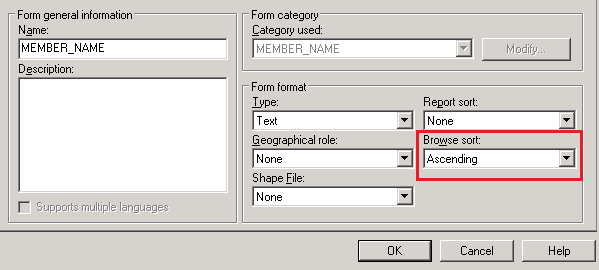
One possible cause is that at least one of the attribute MDX forms has a sort defined. This setting can be seen when editing the MDX attribute form, through the attribute editor:

ka02R000000kcVTQAY_0EM440000002ClH.png

 
ACTION:
Edit the attribute and set "Browse Sort" to None for all the MDX attribute forms. A Schema Update is required so the changes take effect.


Comment

0 comments

Details

Knowledge Article

Published:

April 14, 2017

Last Updated:

April 14, 2017