Using the Strategy Web SDK, it is possible to set the alias of an attribute or metric on a grid inside a Report Services Document on-the-fly.
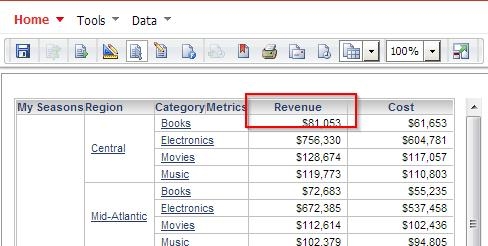
Before Customization:
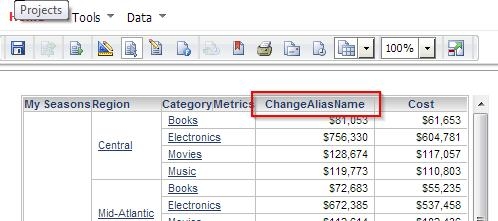
After Customization:
package customclasses.addons;

import com.Strategy.web.app.addons.AbstractAppAddOn;
import com.Strategy.web.app.beans.PageComponent;
import com.Strategy.web.beans.RWBean;
import com.Strategy.web.beans.WebBeanException;
import com.Strategy.web.objects.SimpleList;
import com.Strategy.web.objects.WebObjectsException;
import com.Strategy.web.objects.WebTemplate;
import com.Strategy.web.objects.WebTemplateMetric;
import com.Strategy.web.objects.WebTemplateMetrics;
import com.Strategy.web.objects.rw.EnumRWUnitTypes;
import com.Strategy.web.objects.rw.RWData;
import com.Strategy.web.objects.rw.RWDefinition;
import com.Strategy.web.objects.rw.RWGridGraphDef;
import com.Strategy.web.objects.rw.RWInstance;
import com.Strategy.web.objects.rw.RWUnitDef;

public class ChangeObjectAliasinGrid extends AbstractAppAddOn {

	public String getAddOnDescription() {
		return "Addon set Alias for objects on grid in document";
	}

	public void postCollectData(PageComponent page) {
		RWBean rwb = null;
		rwb = (RWBean) page.getChildByClass(RWBean.class);
		if (rwb == null) return;

		// Only want this to affect a specific document. Document ID specified here.
		String docID = "2E0AEBFE4988DED7954BD2A00E56F7BF";
		try {
			// check if currently open document matches above ID. End code execution if not.
			if (!rwb.getObjectID().equalsIgnoreCase(docID))
				return;

		} catch (WebBeanException e) {
			e.printStackTrace();
		}

		RWInstance inst;
		try {
			inst = rwb.getRWInstance();
			RWData data = inst.getData();

			// Retrieve document definition
			RWDefinition def = inst.getDefinition();
			String key = null;

			// Name of grid object to be accessed
			String gridName = "myGrid";

			RWGridGraphDef grid = null;

			// Find grid/graph units within document definition.
			RWUnitDef[] units = def.findUnitsByType(EnumRWUnitTypes.RWUNIT_GRIDGRAPH);

			// Obtain key for selector, where name of selector matches the string stored in gridName.
			for (int i = 0; i < units.length; i++) {
				System.out.println("units=" + units.getName());

				if (units.getName().equals(gridName)) {
					key = units.getKey();
					System.out.println("key=" + key);
					grid = (RWGridGraphDef) units;
				}
			}
			// Retrieve template from grid. Required to retrieve list of metrics.
			WebTemplate gridTemplate = grid.getViewInstance().getTemplate();

			// Retrieve attributes from grid (needed if customization is required for attributes on grid).
			// SimpleList list = gridTemplate.getTemplateAttributes();

			// Retrieve metrics from grid (needed if customization is required for metrics on grid).
			WebTemplateMetrics metrics = gridTemplate.getTemplateMetrics();
			WebTemplateMetric metric = null;

			// Loop through metrics on grid.
			for (int i = 0; i < metrics.size(); i++) {
				metric = metrics.get(i);

				// If metric name matches metric we are looking for, set alias as desired
				if (metric.getName().equalsIgnoreCase("Revenue")) {
					metric.setAlias("ChangeAliasName");
				}
			}

			// Apply changes to report instance
			inst.getRWManipulator().applyChanges();
			rwb.collectMinimalData();

		} catch (WebBeanException e) {
			e.printStackTrace();
		} catch (WebObjectsException e) {
			e.printStackTrace();
		}
	}
}
