EducationSoftwareStrategy.com
StrategyCommunity

Knowledge Base

Product

Community

Knowledge Base

TopicsBrowse ArticlesDeveloper Zone

Product

Download SoftwareProduct DocumentationSecurity Hub

Education

Tutorial VideosSolution GalleryEducation courses

Community

GuidelinesGrandmastersEvents
x_social-icon_white.svglinkedin_social-icon_white.svg
Strategy logoCommunity

© Strategy Inc. All Rights Reserved.

LegalTerms of UsePrivacy Policy
  1. Home
  2. Topics

KB438434: How To Deploy MicroStrategy Mobile From Apple Store Via AirWatch 9.1.1.10


Rebecca Lam

Senior Customer Success Manager, Enterprise • MicroStrategy


This article describes how to push the out of the box MicroStrategy Mobile app from the Apple Store via AirWatch 9.1.1.10.

As of Strategy Mobile iOS 10.5/Strategy Mobile Android 10.7, Strategy's mobile application is AppConfig compliant, allowing administrators the ability to leverage the Strategy Mobile application from the Apple Store to configure and push to their users.  The following article shows how the Strategy Mobile application from the Apple Store/Google Play Store can be uploaded into AirWatch 9.1.1.10 for distribution.  Note that the application pushed will always be the latest Strategy Mobile application available in either the Apple Store or Google Play Store (non-customized).   
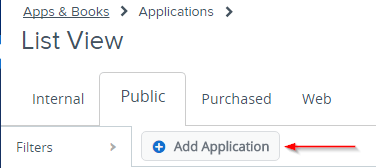
  • Navigate to Apps & Books > Applications in list view in the AirWatch Administrator Console.
  • Click on the Public tab and click the Add Application button:

ka0PW0000000ptlYAA_0EM440000002cSq.png
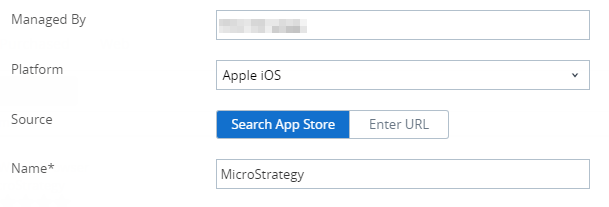
  • The Add Application editor will appear.  Select Apple iOS as the platform and add a name for the application ("Strategy") to be searched upon:

ka0PW0000000ptlYAA_0EM440000002cSv.png
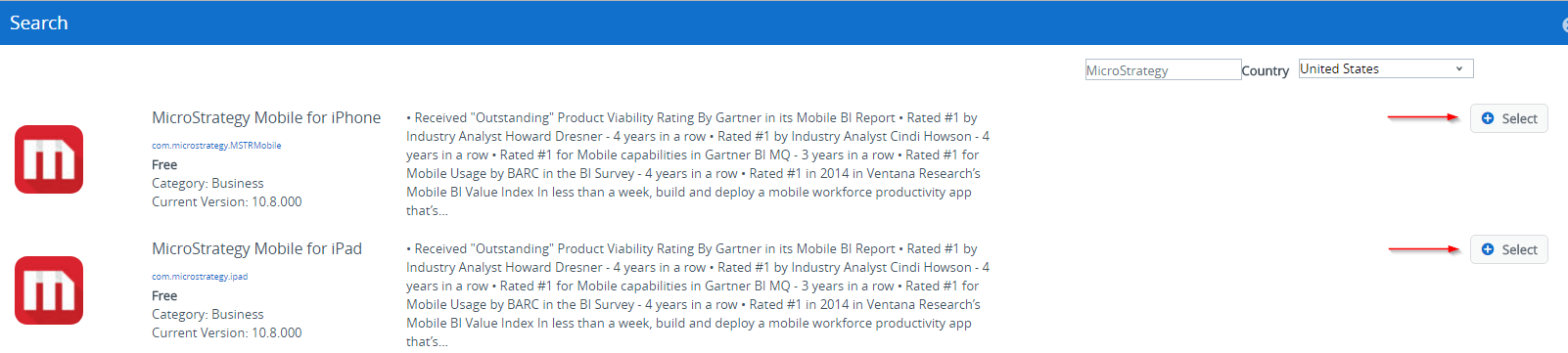
  • Both Strategy applications will appear in the search results. Select the application desired:

ka0PW0000000ptlYAA_0EM440000002cT0.png
  • Strategy related configuration that is defined via AirWatch, such as supplying Strategy Mobile Configuration URL, security policies/access control and app tunneling can be found here: Integration with AppConfig compliant EMM vendors .
  • Repeat steps 1-5 to add additional Strategy applications.

 
  KB438434


Comment

0 comments

Details

Knowledge Article

Published:

July 28, 2017

Last Updated:

February 20, 2024