A mobile configuration lets you establish connectivity between your mobile device and the Strategy Mobile server. It enables the Strategy Mobile app on your mobile device to communicate with the Strategy Mobile server. When you create a mobile configuration, there are two XML files that are created:
The mobileConfigurationIndex.xml is an index of all the mobile configurations that have been defined on the mobile server. For example, in the following image, the mobileConfigurationIndex.xml file points to a mobile configuration defined for the iPhone.

The mobileConfig-<code>.xml file contains the information for the mobile configurations listed in the mobileConfigurationIndex.xml file. For example, in the following image, the mobileConfig-<code>.xml file displays information about the iPhone mobile configuration that's listed in the mobileConfigurationIndex.xml file.

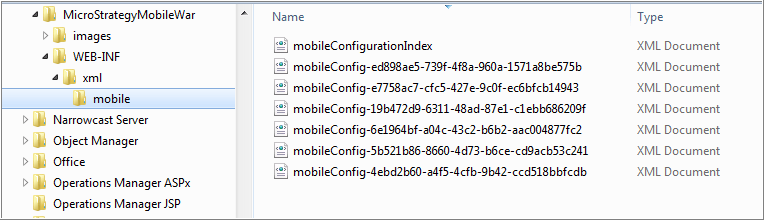
By default, these files are stored in the following location:
<Mobile Application Deployment Path>/WEB-INF/xml/mobile
For example, the default location on a Windows machine is: C:\Program Files (x86)\MicroStrategy\Mobile Server ASPx\WEB-INF\xml\mobile
KB438504
