EducationSoftwareStrategy.com
StrategyCommunity

Knowledge Base

Product

Community

Knowledge Base

TopicsBrowse ArticlesDeveloper Zone

Product

Download SoftwareProduct DocumentationSecurity Hub

Education

Tutorial VideosSolution GalleryEducation courses

Community

GuidelinesGrandmastersEvents
x_social-icon_white.svglinkedin_social-icon_white.svg
Strategy logoCommunity

© Strategy Inc. All Rights Reserved.

LegalTerms of UsePrivacy Policy
  1. Home
  2. Topics

KB438505: In Windows 10, users get an error when creating a DSN to Microsoft Access (.accdb) metadata


Community Admin

• Strategy


This article discusses the reason for getting an error when creating a DSN to Access metadata (.accdb file) and the steps to resolve it.

In Windows 10, when creating a DSN to Microsoft Access (.accdb) metadata using the Strategy Connectivity Wizard, users get the following error:
An error occurred while creating the DSN:Error in Saving the DSN:RegistrySubKeys::OpenSubKey - Key not found
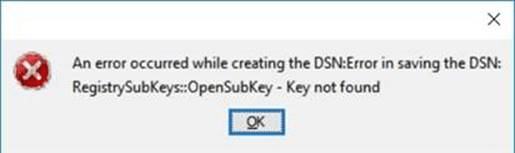
ka04W000000Oay6QAC_0EM440000002dCA.png

The error happens because the 64-bit Windows 10 system does not come with the 32-bit Access driver. To resolve the error, do the following:
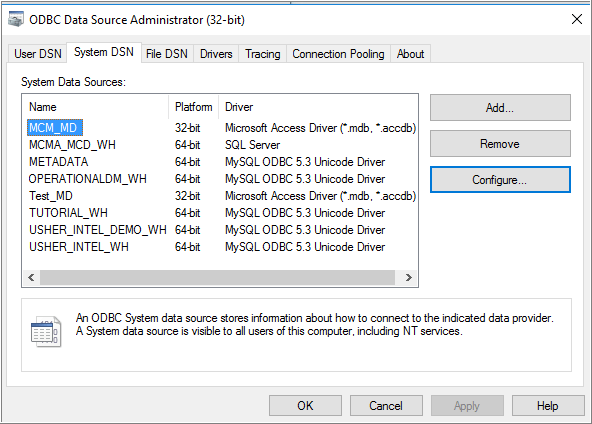
  • Download the Access database driver (AccessDatabaseEngine.exe) from http://www.microsoft.com/en-us/download/confirmation.aspx?id=23734. Once you have installed the driver, you will be able to see Microsoft Access driver (*.mdb, *.accdb) as an option in the 32-bit ODBC Administrator.
ka04W000000Oay6QAC_0EM440000002dIw.png
  • Use the 32-bit ODBC Administrator or Strategy Connectivity Wizard to create the DSN to your metadata.The error should no longer occur.


Take the Administration for Enterprise Analytics (10.311) course to learn more about establishing connectivity with the data sources in the Strategy Analytics platform environment.
  KB438505


Comment

0 comments

Details

Knowledge Article

Published:

August 10, 2017

Last Updated:

December 31, 2018