EducationSoftwareStrategy.com
StrategyCommunity

Knowledge Base

Product

Community

Knowledge Base

TopicsBrowse ArticlesDeveloper Zone

Product

Download SoftwareProduct DocumentationSecurity Hub

Education

Tutorial VideosSolution GalleryEducation courses

Community

GuidelinesGrandmastersEvents
x_social-icon_white.svglinkedin_social-icon_white.svg
Strategy logoCommunity

© Strategy Inc. All Rights Reserved.

LegalTerms of UsePrivacy Policy
  1. Home
  2. Topics

KB438607: The error “Failed to download the following open source software files” is encountered when trying to install MicroStrategy Secure Enterprise 10.8


Shugo Sonobe

Principal Consultant • MicroStrategy


This technical note describes a known issue in which installing MicroStrategy Secure Enterprise 10.8 fails due to failing to download the R-3.3.3 installer. The issue impacts both Express and Custom installation and only occurs in a Windows environment. A workaround is available at the end of this technical note.

SUMMARY
This Knowledge Base article describes a known issue in which installing Strategy Secure Enterprise 10.8 fails due to a failure in downloading the R-3.3.3 installer. The issue impacts both Express and Custom installation and only occurs in a Windows environment. A workaround is available at the end of this document.
 
SYMPTOM
Starting in Strategy Secure Enterprise 10.8, the installer provides the option to install R as shown below:

ka02R000000kb33QAA_0EM44000000VlO4.jpeg

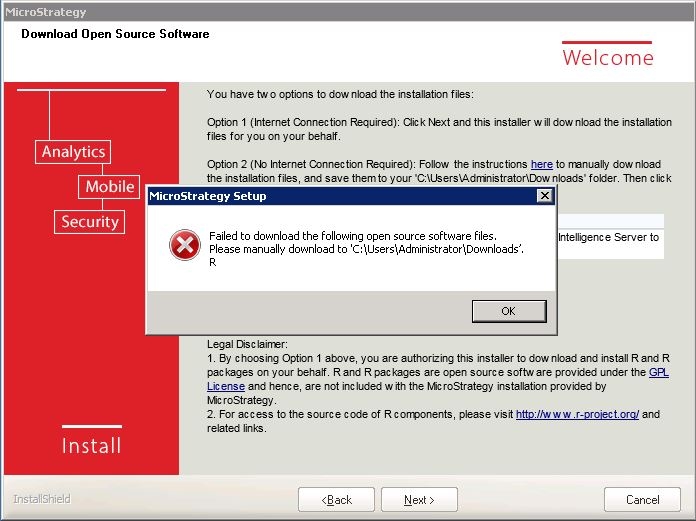
When this bundle option is enabled in a Windows environment, the following error message gets generated during the installation.
ka02R000000kb33QAA_0EM44000000VlO9.jpeg


Failed to download the following open source software files.
Please manually download to ‘C:Users\Administrator\Downloads’.
R

CAUSE
When the bundle option is enabled, the Strategy installer downloads and places the R-3.3.3 installer to ‘C:\Users\%USERNAME%\Downloads’. However, the CRAN released a newer version of R (3.4.x) and archived R-3.3.3, which caused the previous URL to the R-3.3.3 installer to change and become invalid.
 
WORKAROUND
Follow the steps listed on the screen under 'Option 2 (No Internet Connection Required)' to manually download the R installer and work around the issue:

  1. Manually download the R-3.3.3 installer (link)
  2. Place the R installer into the users’ Downloads folder ‘C:\Users\%USERNAME%\Downloads’
  3. Continue with the installation.

ACTION
This issue will be addressed in the next Strategy Secure Enterprise release scheduled to be released in Q3 2017.
  38607 KB438607


Comment

0 comments

Details

Knowledge Article

Published:

September 6, 2017

Last Updated:

December 31, 2018