SYMPTOM
KDC_ERR_S_PRINCIPAL_UNKNOWN error is shown in the network log while requesting a service ticket for Service Principal Name(SPN), MSTRSVRSvc/I-server:34952@DOMAIN, during Kerberos database pass-thru authentication while the user has successfully performed cross domain Kerberos authentication and logged into Strategy Intelligence Server via Strategy Web using Integrated authentication (Kerberos).
CAUSE
This issue happens when the end user and the service (Intelligence server in this case) are located in different windows forests. When a service ticket request for an SPN (for Intelligence Server) is sent to a domain controller located in the forest where the end user resides, DC_ERR_S_PRINCIPAL_UNKNOWN is returned as this forest does not contain Intelligence Server's SPN in its Global Catalog since Intelligence Server belongs to a different forest.
ACTION
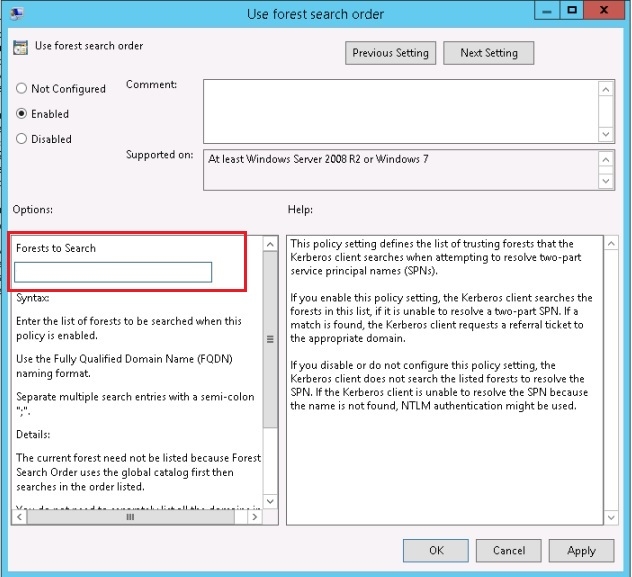
Configure Kerberos Forest Search Order (KFSO) to list the forest where Intelligence Server resides first. For example, domain1 is where I-Server resides, then the search filter should be "domain1.I-Server.com;domain2.user.com". For more information about how Kerberos Forest Search Order works, refer to the Microsoft article.
This is an example of the "Use forest search order" editor:
Note: As described above, when this issue happens, the end user is able to login into Strategy Intelligence Server via Strategy Web. This indicates the Trust between forests and domains has been configured correctly. For more information about Domain and Forests trusts, please refer to detailed documentation from Microsoft:
KB438623
