EducationSoftwareStrategy.com
StrategyCommunity

Knowledge Base

Product

Community

Knowledge Base

TopicsBrowse ArticlesDeveloper Zone

Product

Download SoftwareProduct DocumentationSecurity Hub

Education

Tutorial VideosSolution GalleryEducation courses

Community

GuidelinesGrandmastersEvents
x_social-icon_white.svglinkedin_social-icon_white.svg
Strategy logoCommunity

© Strategy Inc. All Rights Reserved.

LegalTerms of UsePrivacy Policy
  1. Home
  2. Topics

KB4387: How to create a template in MicroStrategy Developer


Stefan Zepeda

Salesforce Solutions Architect • Strategy


How to create a template in MicroStrategy Developer

What are templates?
A template in Strategy Developer 8.x defines the layout of general categories of information in a report. In a template, users specify the information for retrieval from the data warehouse and the way it is to be displayed in each of the modes of reporting.
 
How can users access the Template Editor?
To access the Template Editor, execute the following:

  • From the File menu, go to New and choose Template.
     
ka044000000kInvAAE_0EM440000002GJF.gif
  •  
    NOTE: Users must be granted 'Create Application Objects' and 'Use Template Editor' privileges.

 
How do users create a template?

  • In the Template Editor, from the Object Browser double-click the on attributes to be added in the Template definition.
     
ka044000000kInvAAE_0EM440000002GJD.gif
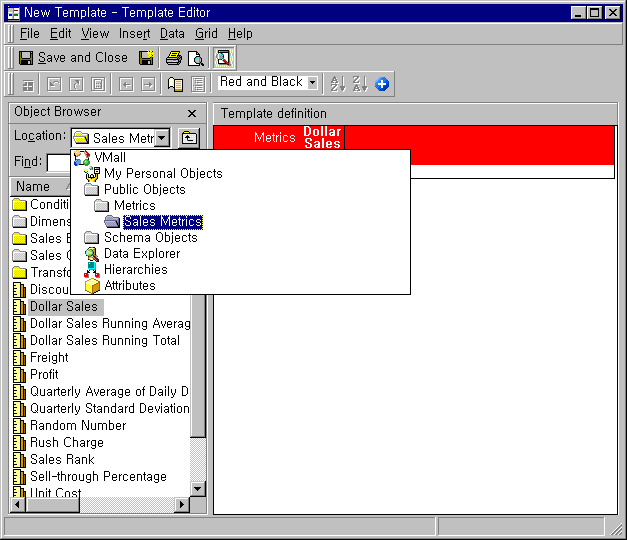
  • From the Object Browser, double-click on the metrics to be added in the Template definition.
     
ka044000000kInvAAE_0EM440000002GJJ.gif
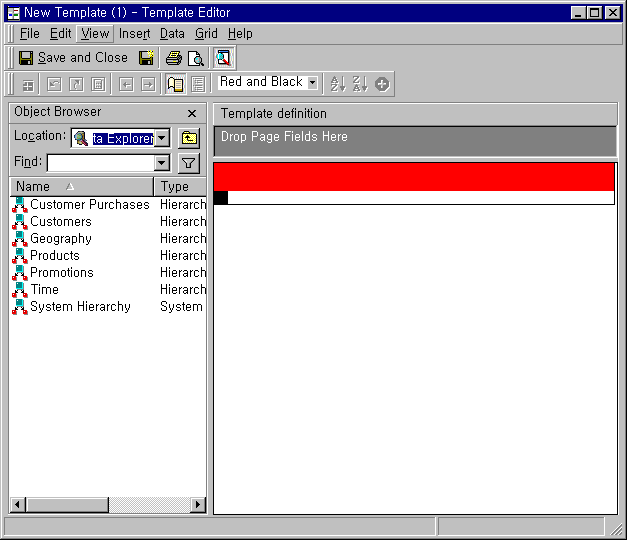
  • To use the Page-by functionality, from the View menu, choose Show Pages. The Drop Page Fields Here section appears under Template definition.
     
ka044000000kInvAAE_0EM440000002GJ4.gif
  • From the Object Browser, select the objects to be included in the page section, and drag and drop them into the Drop Page Fields Here section.
     
ka044000000kInvAAE_0EM440000002GJH.gif
  •  
    Only the following objects can be used as page fields:
    • Attributes
    • Metrics
    • Hierarchies
    • Consolidations
    • Object Prompts (Attribute)
    • Object Prompts (Metric) - This object type can only be used as a page field if the row or column does not have a metric.
    • Object Prompts (Hierarchy)
    • Object Prompts (Consolidation)
  • Save the template.
  • Use the template in the creation of a report.


KB4387


Comment

0 comments

Details

Knowledge Article

Published:

June 8, 2017

Last Updated:

December 31, 2018