EducationSoftwareStrategy.com
StrategyCommunity

Knowledge Base

Product

Community

Knowledge Base

TopicsBrowse ArticlesDeveloper Zone

Product

Download SoftwareProduct DocumentationSecurity Hub

Education

Tutorial VideosSolution GalleryEducation courses

Community

GuidelinesGrandmastersEvents
x_social-icon_white.svglinkedin_social-icon_white.svg
Strategy logoCommunity

© Strategy Inc. All Rights Reserved.

LegalTerms of UsePrivacy Policy
  1. Home
  2. Topics

KB438731: An R metric returns a blank value after encountering the error “all connections are in use” in MicroStrategy Secure Enterprise 9.4.x - 10.x


Shugo Sonobe

Principal Consultant • MicroStrategy


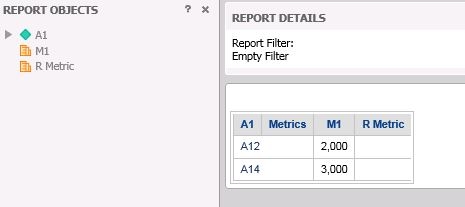
This Knowledge Base article describes an issue in which R metrics start showing blank values. The cause of the issue is that a file open function is used in an R script, and the resolution is available at the end of this document.

SYMPTOM:
When running a previously working report with an R metric, it suddenly starts displaying blank values for the R metric as shown below. 
ka02R000000kbEPQAY_0EM44000000Q0mE.jpeg

When this issue occurs, all the R metrics in other reports also show blank values until the Strategy Intelligence Server is restarted.
If a tryCatch function is used, the following errors may be captured in the DSSErrors.log and RscriptErrors.log:
DSSError.log


[Analytical Services][Error][0x80042425] Analytical Engine Error. Apply function failed. Internal error 
[Analytical Services][Error][0x80042434] Analytical Engine plug-in function error: [CRFPCommonNNGRN::ExRScript: R script execution failed: all connections are in use] 
R script execution failed: all connections are in use 
[Analytical Services][Error][0x80042434] Analytical Engine plug-in function error: [CRSupport::ReadScript: The expression readLines([script filepath]) failed evaluation. Please check _RScriptFile parameter setting.]

RscriptErrors.log

CRFPCommonNNGRN::ExRScript: R script execution failed: all connections are in use
CRSupport::ReadScript: The expression readLines([script filepath]) failed evaluation.  Please check _RScriptFile parameter setting.

CAUSE
One possible cause for this issue is that the R script is using a file open function without a close function. Since there is no close function, the number of open connections increases every time a report with a R metric is executed, eventually reaching the point where R cannot open any more connections, which causes the Strategy Intelligence Server to not properly execute any R scripts.
ACTION
This issue can be prevented by adding the close file connection function in the R script, similar to below

con <- file("foo")
open(con)
on.exit(close(con), add=TRUE)

KB438731


Comment

0 comments

Details

Knowledge Article

Published:

October 9, 2017

Last Updated:

October 9, 2017