Starting with the release of Strategy ONE (March 2024), dossiers are also known as dashboards.
In Strategy Library 10.9, you may be unable to see the Library icon when using Internet Explorer 11. Howver, the Library icon does appear on Google Chrome.
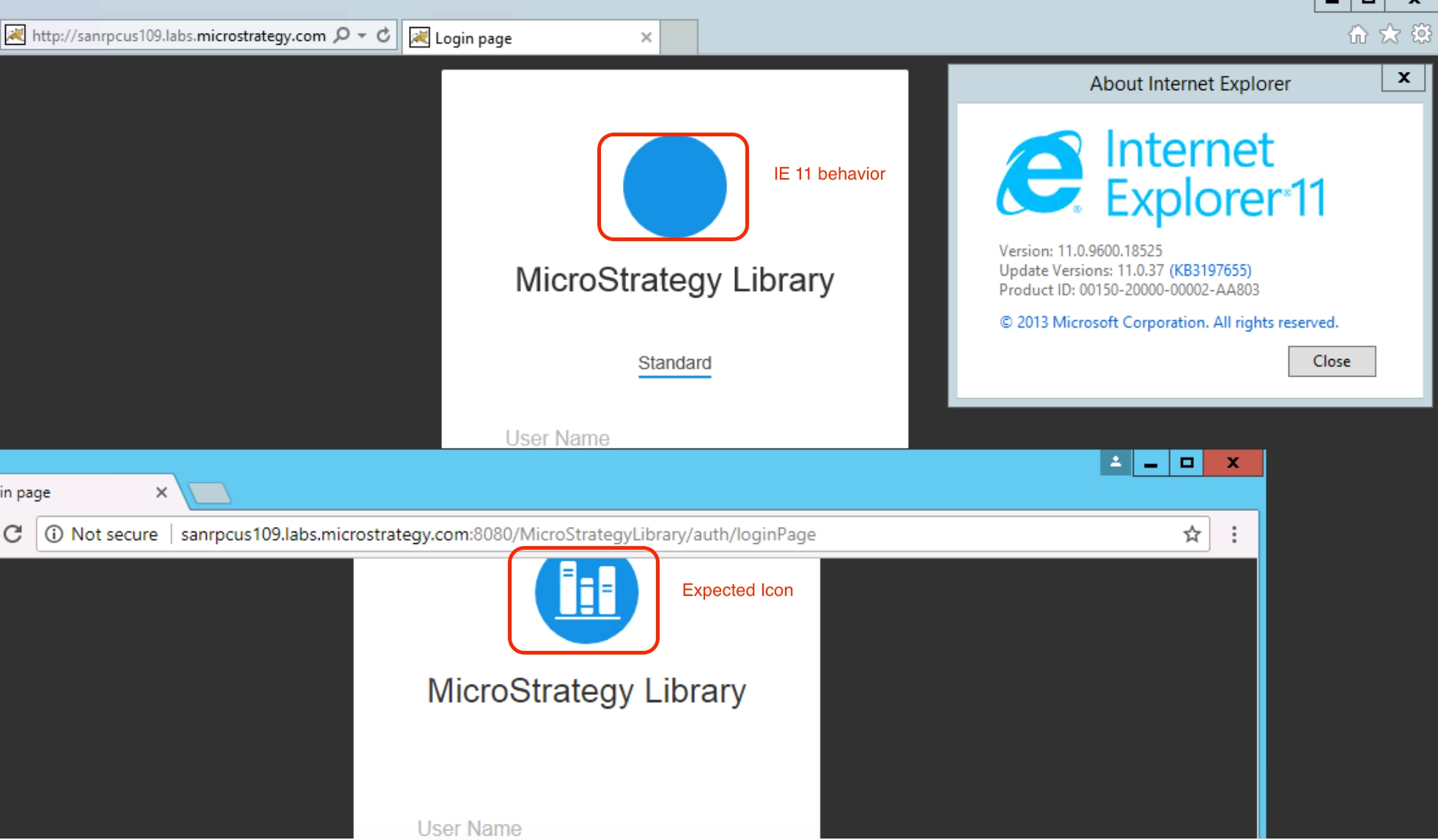
This error is related to Window's Group Policy setting called Untrusted Font Blocking, which was introduced in the first release of Windows 10.
At the beginning, this setting was enabled by default because Microsoft considered it to be a powerful mitigation against attacks on GDI's font logic. However, this setting also introduced a separate, always-on mitigation against GDI font-rendering bugs and caused several icon errors, like this one, in Microsoft's own products.
As of Windows 10 v1703, Microsoft has changed the setting's default to disabled. For earlier OS, you must manually disable this setting and modify the security and accessibility settings of IE 11.
Modify Windows OS security features to disable Untrusted Font Blocking:
HKEY_LOCAL_MACHINE\SYSTEM\CurrentControlSet\Control\Session Manager\Kernel\.
Modify IE 11 Security Setting to enable Allow Font Download:
Modify IE 11 Accessibility Settings to allow font styles specified on web pages:
Interested in learning more about Strategy Library? Check out our Library videos on Learning Center or the following Education Courses:
