EducationSoftwareStrategy.com
StrategyCommunity

Knowledge Base

Product

Community

Knowledge Base

TopicsBrowse ArticlesDeveloper Zone

Product

Download SoftwareProduct DocumentationSecurity Hub

Education

Tutorial VideosSolution GalleryEducation courses

Community

GuidelinesGrandmastersEvents
x_social-icon_white.svglinkedin_social-icon_white.svg
Strategy logoCommunity

© Strategy Inc. All Rights Reserved.

LegalTerms of UsePrivacy Policy
  1. Home
  2. Topics

KB438770: How can users obtain a Java Thread Dump for a Tomcat Web Server running on Windows operating systems?


Monica Gallegos Salazar

Principal Product Specialist • MicroStrategy


This article explains how can users get a Java Thread Dump for a Tomcat Web Server running on Windows operating systems. This is valuable in understanding and isolating problems related to stability, performance, memory consumption, CPU utilization, etc.

To get Java thread dumps for a Tomcat Web Server running on Windows Operating Systems, the next steps can be followed:

  1. Get the PID (Process Identifier) for your Java process. This can be done in one of the following ways:
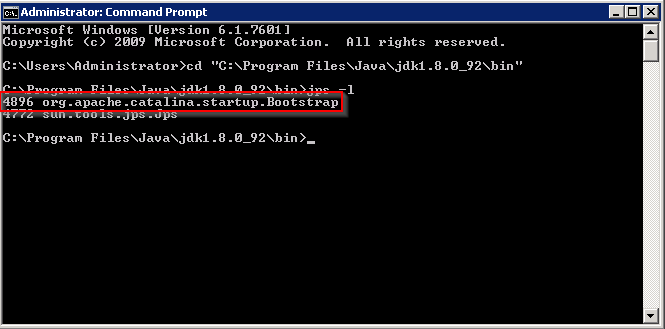
    1. Command prompt – Navigate to the bin folder of the JDK and use the command


jps -l

This will show a list of the Java processes running:

ka02R000000kb3NQAQ_0EM44000000Q2X1.png
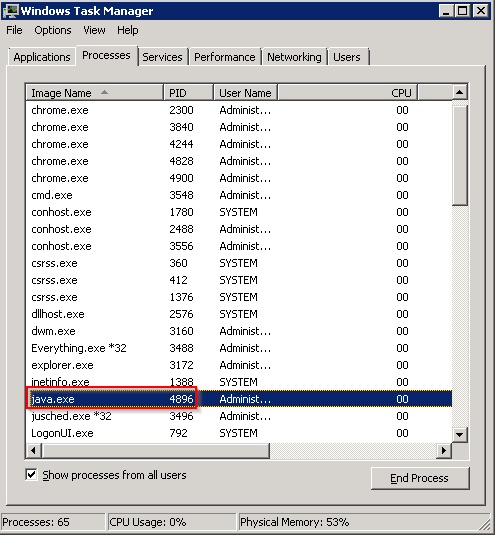
  1. Task Manager - Open Task Manager and navigate to the Processes tab; scroll to the java.exe process and take note of the PID:
ka02R000000kb3NQAQ_0EM44000000Q2X6.png


NOTE: If the PID column doesn’t show, you can enable it by going to Options – Select Columns:
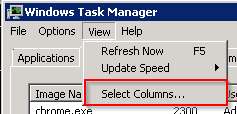
ka02R000000kb3NQAQ_0EM44000000Q2XB.png

And select the PID (Process Identifier) column:
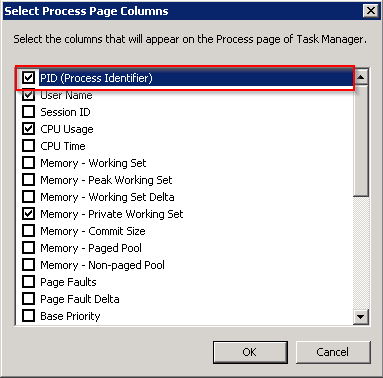
ka02R000000kb3NQAQ_0EM44000000Q2XG.png
  1. Request a thread dump from the JVM – This can be done with the command:


jstack -l PID > file.log

The “> file.log” command will create a new file and insert the contents of the Java thread dump.
 
Third Party Software Installation:
WARNING:
The third-party product(s) discussed in this technical note is manufactured by vendors independent of Strategy. Strategy makes no warranty, express, implied or otherwise, regarding this product, including its performance or reliability. KB438770


Comment

0 comments

Details

Knowledge Article

Published:

October 17, 2017

Last Updated:

December 28, 2018