SUMMARY:
In Strategy 10.7 and later versions, users may get the error "Datasources.xml can not be found or loaded" when opening the MDX Cube Catalog. This document explains a possible cause of this issue and how it can be resolved.
SYMPTOM:
After upgrading to Strategy 10.7 or later, when trying to open the MDX Cube Catalog in Developer, users may see the following error:
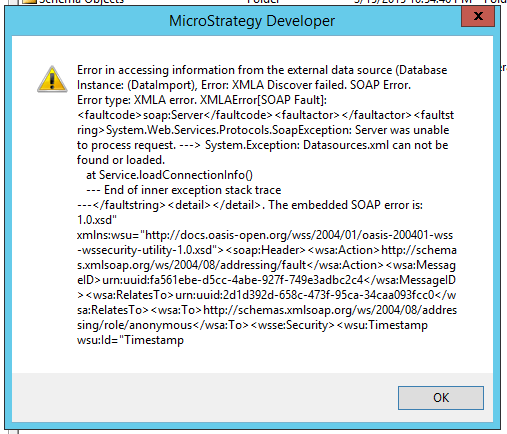
Using the XMLA test tool, and testing the connection to the target URL, the same error is seen:
Welcome to XMLATest.
Please type the target URL, starting with http:
http://localhost/StrategyMDX/StrategyMDX.asmx
Do you wish to use Kerberos authentication (y/n) ?
n
Please type the UID to login to that URL. If no UID needed, just press <ENTER> k
ey:

Please type the name of the DataSource on XMLA source. If unknown, just press <E
NTER> key:

*   Trying ::1...
* Connected to localhost (::1) port 80 (#0)
> POST /StrategyMDX/StrategyMDX.asmx HTTP/1.1
Host: localhost
Accept: */*
Content-Type: text/xml
soapaction: "urn:schemas-microsoft-com:xml-analysis:Discover"
Provider-Init:000000011d7a7f27e67365a4d591f3eb36188754b25f2ffe13b7fd74a17ef14b5f
57b57090a1d9e8616344bdadb2b3f6ca38385269ea6b55c7af724ccdb4c910710677518c7f558957
e640cc4b94608c
Content-Length: 492

* upload completely sent off: 492 out of 492 bytes
< HTTP/1.1 500 Internal Server Error
< Cache-Control: private
< Content-Type: text/xml; charset=utf-8
< Server: Microsoft-IIS/8.5
< X-AspNet-Version: 4.0.30319
< X-Powered-By: ASP.NET
< Date: Wed, 25 Oct 2017 21:47:48 GMT
< Content-Length: 1378
<
* Connection #0 to host localhost left intact
Get SOAP Fault:
################################
<?xml version="1.0" encoding="utf-8"?><soap:Envelope xmlns:soap="http://schemas.
xmlsoap.org/soap/envelope/" xmlns:xsi="http://www.w3.org/2001/XMLSchema-instance
" xmlns:xsd="http://www.w3.org/2001/XMLSchema" xmlns:wsa="http://schemas.xmlsoap
.org/ws/2004/08/addressing" xmlns:wsse=
"http://docs.oasis-open.org/wss/2004/01/oasis-200401-wss-wssecurity-secext-1.0.xsd" xmlns:wsu="http://docs.oasis-open.org
/wss/2004/01/oasis-200401-wss-wssecurity-utility-1.0.xsd"><soap:Header><wsa:Acti
on>http://schemas.xmlsoap.org/ws/2004/08/addressing/fault</wsa:Action><wsa:Messa
geID>urn:uuid:f640e616-c447-45dd-a752-7896bc9c3128</wsa:MessageID><wsa:RelatesTo
>urn:uuid:7f81c860-504a-42a2-8033-c5824a67ea56</wsa:RelatesTo><wsa:To>http://sch
emas.xmlsoap.org/ws/2004/08/addressing/role/anonymous</wsa:To><wsse:Security><ws
u:Timestamp wsu:Id="Timestamp-79d98874-b140-4270-a372-15f746128fdc"><wsu:Created
>2017-10-25T21:47:48Z</wsu:Created><wsu:Expires>2017-10-25T21:52:48Z</wsu:Expire
s></wsu:Timestamp></wsse:Security></soap:Header><soap:Body><soap:Fault><faultcod
e>soap:Server</faultcode><faultstring>System.Web.Services.Protocols.SoapExceptio
n: Server was unable to process request. ---> System.Exception: Datasources.x
ml can not be found or loaded.
   at Service.loadConnectionInfo()
   --- End of inner exception stack trace ---</faultstring><detail /></soap:Faul
t></soap:Body></soap:Envelope>
================================
End of XMLATest run. Press <ENTER> to quit.
