EducationSoftwareStrategy.com
StrategyCommunity

Knowledge Base

Product

Community

Knowledge Base

TopicsBrowse ArticlesDeveloper Zone

Product

Download SoftwareProduct DocumentationSecurity Hub

Education

Tutorial VideosSolution GalleryEducation courses

Community

GuidelinesGrandmastersEvents
x_social-icon_white.svglinkedin_social-icon_white.svg
Strategy logoCommunity

© Strategy Inc. All Rights Reserved.

LegalTerms of UsePrivacy Policy
  1. Home
  2. Topics

KB43901: How to use an image or text as a link to a different panel in the same Mobile document using URL API in MicroStrategy Mobile 9.4.x-10.x.


Community Admin

• Strategy


This KB article discusses a limitation of MicroStratgey Web which affects link on images or text boxes to different panels in MicroStrategy Mobile documents

SYMPTOM:
Even after the following tech note KB40581: How to use Mobile URL API to display a certain panel in a panel selector in MicroStrategy Mobile 9.4.1 - 10.x , mobile users are not able to use an image or a textbox as a link to a different panel in the same mobile document using URL API in Strategy Mobile 9.4.x-10.x.
 
STEPS TO REPRODUCE:
In Strategy Tutorial 9.4.x-10.x:
  • Create a new document, using any report as a data source.
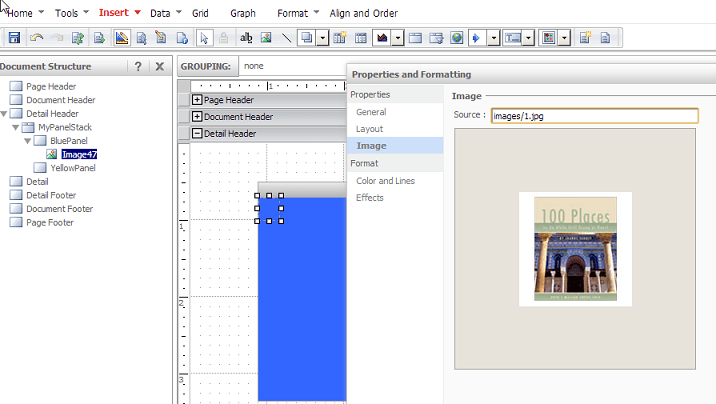
  • In the Detail Header, place a panel stack, named MyPanelStack
  • Add an extra panel to the panel stack so there are a total of two panels, and rename them BluePanel and YellowPanel
  • Add an image to BluePanel, like shown below.
ka04W00000148AyQAI_0EM440000002UvI.png
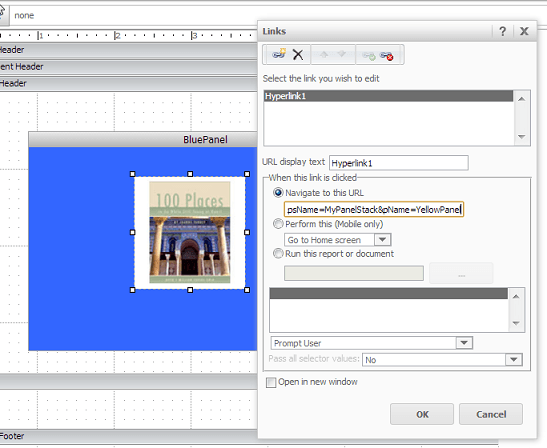
  • Edit Links of the image on BluePanel.
  • Set the URL to be:
    mstr://?evt=2048076&psName=MyPanelStack&pName=YellowPanel
ka04W00000148AyQAI_0EM440000002UvT.png
  • Add an image to YellowPanel and Edit Links of the image.
  • Set the URL to be

    
    mstr://?evt=2048076&psName=MyPanelStack&pName=BluePanel


  • Save the document.
  • Open in Strategy Mobile app for the iPad.
  • Tap on images. They dim as if registering the tap, but they do not change the panel. 

 
CAUSE:
This is working as designed. There are two panel properties, the Panel Name and the Panel title. The URL API parameter is trying to match the Panel Name parameter and not the Panel Title. Changing the name of the panel through Strategy Web changes only the "Panel Title" property, but not the actual "Panel Name" of the panel.  If the properties of the panel are viewed in the Strategy Developer document editor, the Panel Name will be the default panel name assigned when the panel was created, in this case "Panel45", like shown below:
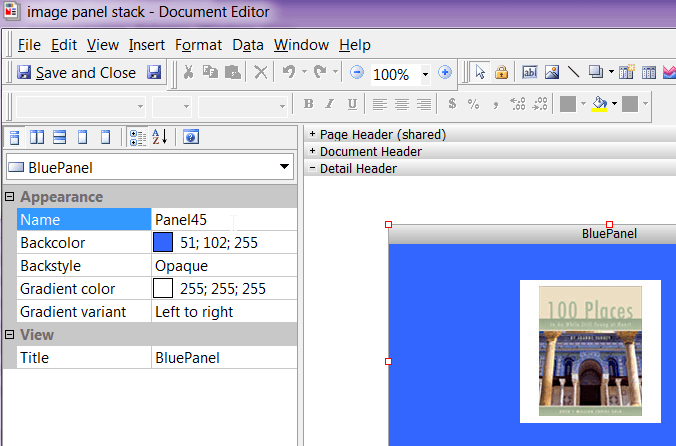
ka04W00000148AyQAI_0EM440000002UvJ.png

ACTION:
Users who wish the panel name property to be exposed in the Strategy Web interface should post in the Ideas Exchange
 
WORKAROUND:
Change the Panel Name property directly in the properties pane within the Strategy Developer document editor to be the same as the Panel Title, like shown below.  
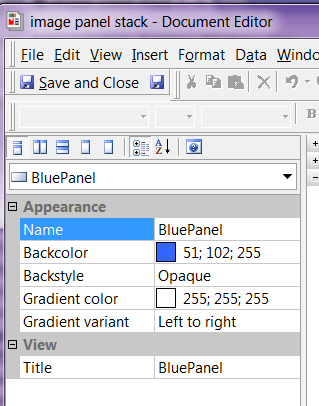
ka04W00000148AyQAI_0EM440000002UvM.png

 
The link should work correctly now. 


Comment

0 comments

Details

Knowledge Article

Published:

July 20, 2017

Last Updated:

July 20, 2017