EducationSoftwareStrategy.com
StrategyCommunity

Knowledge Base

Product

Community

Knowledge Base

TopicsBrowse ArticlesDeveloper Zone

Product

Download SoftwareProduct DocumentationSecurity Hub

Education

Tutorial VideosSolution GalleryEducation courses

Community

GuidelinesGrandmastersEvents
x_social-icon_white.svglinkedin_social-icon_white.svg
Strategy logoCommunity

© Strategy Inc. All Rights Reserved.

LegalTerms of UsePrivacy Policy
  1. Home
  2. Topics

KB439109: Refreshing an Excel sheet containing a report converted to a table produces the error “Failed to add XML to grid.” in MicroStrategy Office 10.x


Shane Winslow

Cloud Support Expert I • MicroStrategy


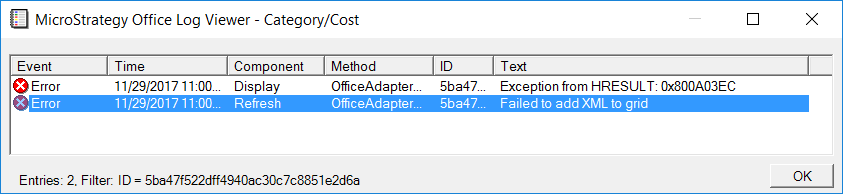
The error "Failed to add XML to grid" is seen in MicroStrategy Office after refreshing the Excel sheet containing a table created from a MicroStrategy report. This is an identified defect in MicroStrategy version 10.x.

SYMPTOM:
Strategy Office offers users the ability to execute reports and documents directly in Microsoft Excel. After executing a report in Excel, users can then convert the report to a table in Excel using the Quick Analysis tool. However, after converting the report to a table, an error is returned when trying to refresh the sheet in Excel containing the table.
ka02R000000kb35QAA_0EM44000000Q8st.png


Failed to add XML to grid.
Exception from HRESULT: 0x800A03EC
STEPS TO REPRODUCE:

  1. In Microsoft Excel, connect to Strategy Tutorial with Strategy Office.
  2. Execute a report.
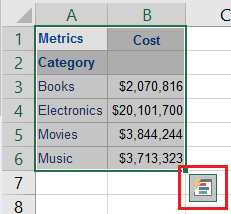
  3. Highlight the report results in Excel (including the headers).
  4. Click the Quick Analysis box that appears in the bottom right corner of the highlighted area.

​

ka02R000000kb35QAA_0EM44000000Q8tS.png
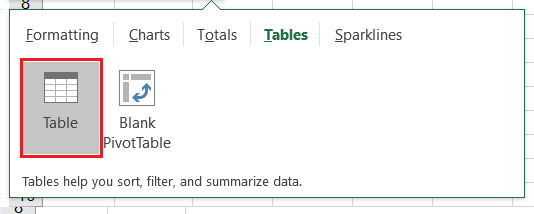
  1. Click Tables > Tables.

​

ka02R000000kb35QAA_0EM44000000Q8tX.png


  1. Refresh the Excel sheet.
  2. Notice the error.

CAUSE:
This is an identified defect in Strategy Office 10.x.
ACTION:
This issue has been addressed in Strategy 10.4.6 and 10.10. Upgrade to this version to take advantage of this fix. KB439109


Comment

0 comments

Details

Knowledge Article

Published:

November 29, 2017

Last Updated:

December 31, 2018