EducationSoftwareStrategy.com
StrategyCommunity

Knowledge Base

Product

Community

Knowledge Base

TopicsBrowse ArticlesDeveloper Zone

Product

Download SoftwareProduct DocumentationSecurity Hub

Education

Tutorial VideosSolution GalleryEducation courses

Community

GuidelinesGrandmastersEvents
x_social-icon_white.svglinkedin_social-icon_white.svg
Strategy logoCommunity

© Strategy Inc. All Rights Reserved.

LegalTerms of UsePrivacy Policy
  1. Home
  2. Topics

KB439116: Changes made to the fixed width of columns containing attributes selected from a hierarchy prompt are not retained when exporting to PDF or Excel in MicroStrategy Web 10.x.


Shane Winslow

Cloud Support Expert I • MicroStrategy


In MicroStrategy Web 10.x, the changes made to a fixed column are not retained if the column contains attributes chosen from a hierarchy prompt. This issue occurs for exports to PDF and Excel.

SYMPTOM
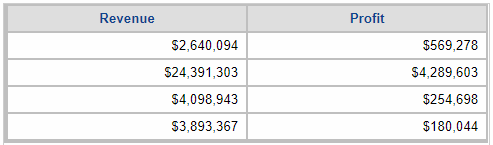
In Strategy Web, users can adjust the column widths in a grid in a document. This is often used to hide certain columns in a grid in a document. For example, the below grid contains the attribute Category with a fixed width of 0.00 inches.
 

ka044000000kKRMAA2_0EM44000000Q8z6.png

 
The hidden column should be retained when exporting the document. However if a hierarchy is placed in the rows of the report that is used for the grid and the report contains a hierarchy prompt, the adjusted fixed width of the column is not retained upon exporting as seen below.

ka044000000kKRMAA2_0EM44000000Q8z1.png

 
The same behavior is seen with exports to PDF and Excel. The issue is only seen with the columns containing the respective hierarchy attribute.
 
STEPS TO REPRODUCE

  1. In Strategy Tutorial, create a report with the Products hierarchy on the row and the Profit and Revenue metrics in columns. 
  2.  Add a hierarchy prompt in the report filter for Products.
  3. Create a document with the reprot and add it to the document as a grid.
  4. Run the document in Editable mode, right click on the product column, and select Resize Columns and Rows...
  5. Set the column width to Fixed at 0.00 inches. 
  6. Run document in presentation mode and notice that column is hidden. 
  7. Export to PDF and notice the product column is no longer hidden in the grid.

CAUSE
This is an identified defect in Strategy Web 10.x.
 
ACTION
Currently, this issue is being reviewed by Strategy for a potential code fix on an upcoming Strategy release.
  KB439116


Comment

0 comments

Details

Knowledge Article

Published:

November 29, 2017

Last Updated:

January 1, 2019