SYMPTOM
When user tries to add to History List more reports than are set in the Maximum number of messages per user is getting the following error message:
“Error in report results. Your request could not be processed due to a server error. Please try again. If the problem persists, contact the server Administrator. (User history list is full.)”

STEPS TO REPRODUCE
1. Go to Strategy Intelligence Server Configuration and set from the Administrator level Maximum number of messages per user to required amount i.e 20.
Strategy Intelligence Server Configuration -> History Settings -> General -> Maximum number of messages per user:
Using the settings in this category, can limit the maximum number of messages per user and the lifetime of each message.
Maximum number of messages per user controls how many messages can exist in a user's History List. This is 10000 by default.
Message lifetime (days) controls how many days messages can exist in a user's History List. The default value -1 means no limit; messages stay in the system until the user deletes them
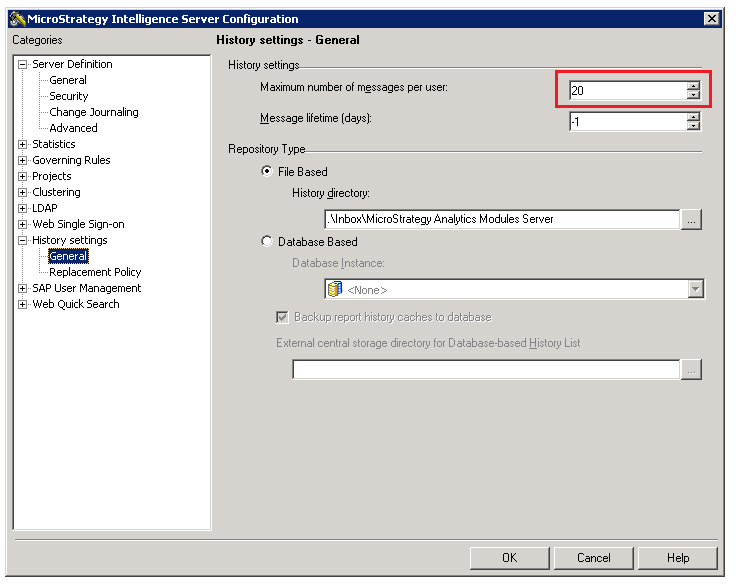
2. In Strategy Web, add manually to History List more reports than the Maximum number of messages per user setting allowed. Notice that error message appears.
CAUSE
This behavior is working as designed. When user tries to add to History List more reports than are set in the Maximum number of messages per user is getting the error message.
ACTION
How to add new messages to the History List without removing the old one manually when the limit is exceeded:
In Replacement Policy set preferable Number of messages deleted to reclaim History List space. When the History List is full and another message is added, Intelligence Server automatically deletes the specified number of messages, beginning with the oldest messages. If this number is set to zero, new messages are not added to the History List until messages are manually removed. By default, this is set to 0.
Specify which messages you want to delete in Delete oldest messages by. This drop-down list controls what timestamp Intelligence Server uses to determine which History List messages are the oldest. User can select from:
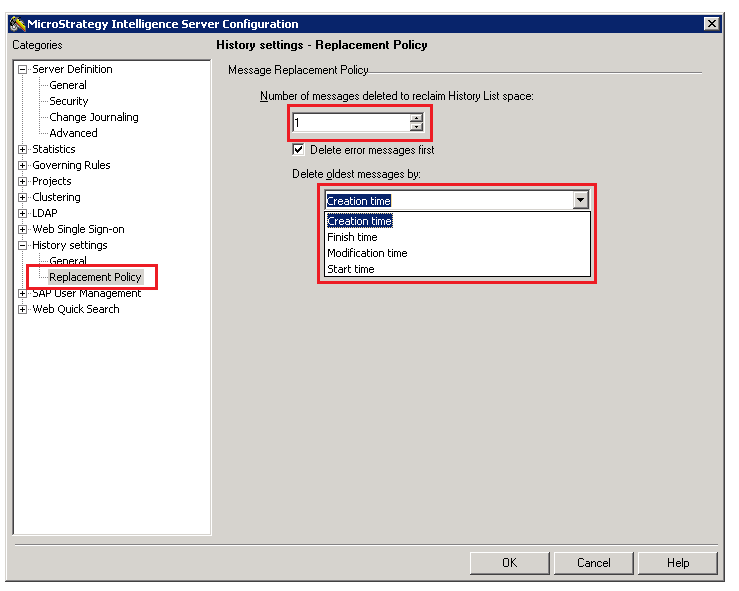
After defining the option in Replacement Policy the messages in History List for specific user will be deleted automatically.
KB439135
