EducationSoftwareStrategy.com
StrategyCommunity

Knowledge Base

Product

Community

Knowledge Base

TopicsBrowse ArticlesDeveloper Zone

Product

Download SoftwareProduct DocumentationSecurity Hub

Education

Tutorial VideosSolution GalleryEducation courses

Community

GuidelinesGrandmastersEvents
x_social-icon_white.svglinkedin_social-icon_white.svg
Strategy logoCommunity

© Strategy Inc. All Rights Reserved.

LegalTerms of UsePrivacy Policy
  1. Home
  2. Topics

KB439209: "The username or password you entered is incorrect" error appears after upgrading to iOS 11 and logging into MicroStrategy Mobile 10.9


Community Admin

• Strategy


This Knowledge Base article describes an issue when the users that has an apostrophe in their Developer Login parameter cannot log in from the MicroStrategy Mobile 10.9 app after upgrading to iOS 11. The error is "The username or password you entered is incorrect". This article provides a solution for that issue.

SYMPTOM
In Strategy Mobile 10.9 support for iOS11 started as per the following Article. However, after the upgrade of the iOS to version 11, Strategy Mobile 10.9 users see the following error message after attempting to log in.

ka04W000000Ofa9QAC_0EM44000000QB5a.png


The username or password you entered is incorrect

The same user was able to log in before the iOS upgrade in the same version of Strategy Mobile 10.9 and can still login successfully from Strategy Web 10.9..
STEPS TO REPRODUCE
Follow these steps to reproduce in a Strategy Tutorial project.

  • In Strategy Developer 10.9, create a user object and define the Developer login parameter with an apostrophe, as shown below: 
ka04W000000Ofa9QAC_0EM44000000QCLA.jpeg
  • Try logging in from Strategy Mobile app 10.9 in iOS 11.x using that user created in step 1, as shown below.
ka04W000000Ofa9QAC_0EM44000000QB5k.png
  • Notice the error message shown at the beginning of this article.

CAUSE
This issue is not caused by Strategy Mobile; it is caused by the character used by the iOS mobile device keyboard being a "curly single close quote" (Alt 0146) while the one used from a regular keyboard is an "apostrophe" (Alt 39). This issue is not specific to Strategy as it happens because the two characters are different and the usernames do not match.
Note: For more information on characters and their alt codes, click here.
ACTION
Use one of the two solutions to fix this issue:

  • In the iOS 11 mobile device, navigate to
    
    settings > general > keyboard > Smart Punctuation
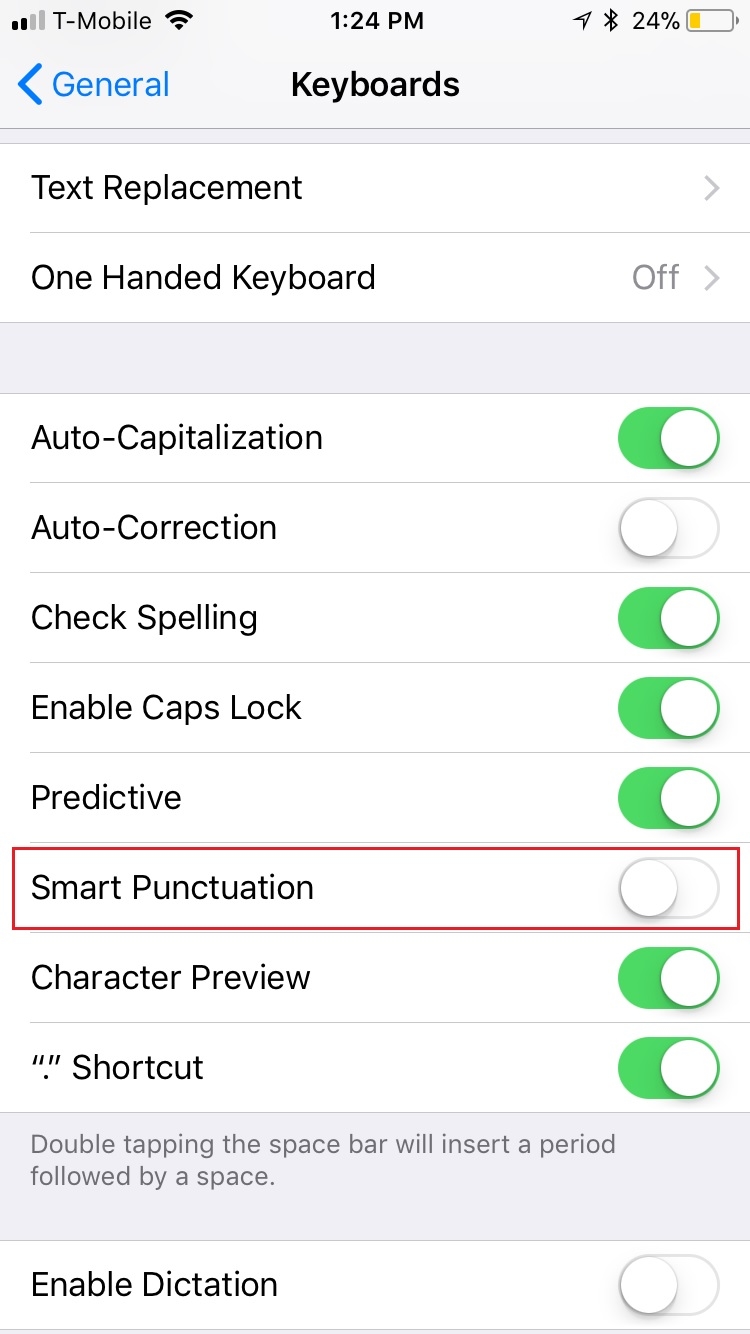
    Disable smart punctuation, as shown below. This will ensure the apostrophe from the iOS keyboard uses the correct alt code.
ka04W000000Ofa9QAC_0EM44000000QCLU.jpeg
  • In Strategy Developer 10.9, the Strategy Administrator can edit the user(s) that contain an apostrophe in their Developer Login parameter and replace the apostrophe with the "curly single close quote" using the alt code: (Alt+0146).

    Caveat: by making this change, the users will have to use this alt code in Strategy Web now to log in successfully to Strategy Web 10.9.

   KB439209


Comment

0 comments

Details

Knowledge Article

Published:

December 20, 2017

Last Updated:

December 28, 2018