SYMPTOM
When designing custom Command Manager 9.4.1 and 10.x scripts, ResultSet columns can be used as part of the script's functionality. For the "List User Connections" procedure, current documentation has incomplete information on available ResultSet columns.
STEPS TO REPRODUCE
1.) Within Command Manager, connect to a Tutorial metadata.
2.) Run the below command:
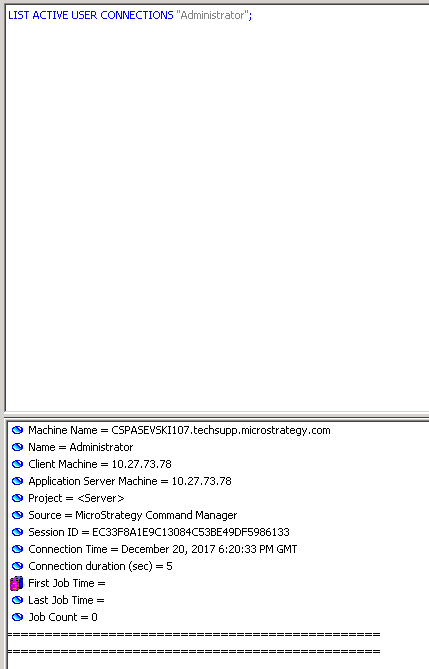
The documentation page below only lists certain ResultSet parameters:
http://www2.Strategy.com/producthelp/10.10/CommandManager/WebHelp/Lang_1033/content/html/cm_syntax_examples/user_connection_management_list_user_connections_statement.htm
ACTION:
The following list contains available ResultSet parameters for use with the "List User Connections" statement:
DisplayPropertyEnum.MACHINE_NAME,
DisplayPropertyEnum.NAME,
DisplayPropertyEnum.CLIENT_MACHINE,
DisplayPropertyEnum.APP_SERVER_MACHINE,
DisplayPropertyEnum.PROJECT,
DisplayPropertyEnum.SOURCE_APP,
DisplayPropertyEnum.SESSION_ID,
DisplayPropertyEnum.CONNECTION_TIME,
DisplayPropertyEnum.TIME_CONNECTED,
DisplayPropertyEnum.FIRST_JOB_TIME,
DisplayPropertyEnum.LAST_JOB_TIME,
DisplayPropertyEnum.JOB_COUNT
