EducationSoftwareStrategy.com
StrategyCommunity

Knowledge Base

Product

Community

Knowledge Base

TopicsBrowse ArticlesDeveloper Zone

Product

Download SoftwareProduct DocumentationSecurity Hub

Education

Tutorial VideosSolution GalleryEducation courses

Community

GuidelinesGrandmastersEvents
x_social-icon_white.svglinkedin_social-icon_white.svg
Strategy logoCommunity

© Strategy Inc. All Rights Reserved.

LegalTerms of UsePrivacy Policy
  1. Home
  2. Topics

KB439289: Quick Symbols thresholds in a document are converted to letters when using Webdings font in Chrome with MicroStrategy 9.x – 10.x


Community Admin

• Strategy


This article provides explanation for Quick Symbols threshold issue with Chrome 52.x and steps to fix it.

SYMPTOM
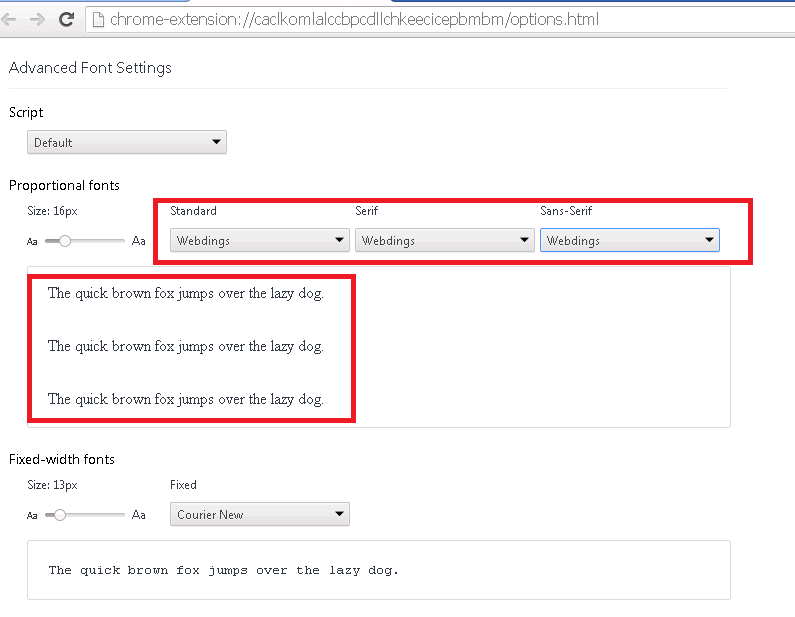
Advanced Font Settings for Chrome:
ka04W000000ObfeQAC_0EM44000000QCaF.png

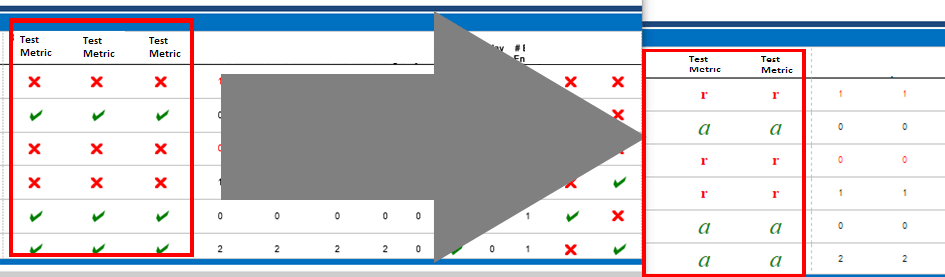
After applying the settings above, Quick Symbols thresholds appear as letters when a document is executed in Strategy Web:
ka04W000000ObfeQAC_0EM44000000QCaK.png

CAUSE
This is a known bug in Chrome 52.x.
ACTION
This bug is fixed starting version 54.x. Upgrade your Chrome browser to take advantage of this fix.
  KB439289


Comment

0 comments

Details

Knowledge Article

Published:

December 21, 2017

Last Updated:

December 6, 2018