EducationSoftwareStrategy.com
StrategyCommunity

Knowledge Base

Product

Community

Knowledge Base

TopicsBrowse ArticlesDeveloper Zone

Product

Download SoftwareProduct DocumentationSecurity Hub

Education

Tutorial VideosSolution GalleryEducation courses

Community

GuidelinesGrandmastersEvents
x_social-icon_white.svglinkedin_social-icon_white.svg
Strategy logoCommunity

© Strategy Inc. All Rights Reserved.

LegalTerms of UsePrivacy Policy
  1. Home
  2. Topics

KB439409: Adding a new form to an existing attribute and trying to delete it later on via Command Manager, returns the error "Item not found in this collection"


Bernardo Avalos

Product Manager • MicroStrategy


This issue has been classified as “defect” by MicroStrategy. It affects MicroStrategy 9.4.x. There is a workaround available and the issue has been fixed in MicroStrategy 9.5 and above.

SYMPTOM:
When attempting to remove an Attribute Form from Command Manager, the following error is returned:
"Item not found in this collection"
The executed command is:
REMOVE ATTRIBUTEFORM "SORTING" FROM ATTRIBUTE "Bola" IN FOLDER "\Schema Objects\Attributes\" FROM PROJECT "New Strategy Tutorial";
STEPS TO REPRODUCE:

  1. Create a new attribute form for any existing attribute. Make sure that the Form Category is set to “None”.


ka02R000000kVQSQA2_0EM44000000QDNH.png


  1. From Command Manager, issue a command for its deletion:


REMOVE ATTRIBUTEFORM "TEST" FROM ATTRIBUTE "Customer" IN FOLDER "\Schema Objects\Attributes\Customers\" FROM PROJECT "Strategy Tutorial";
 

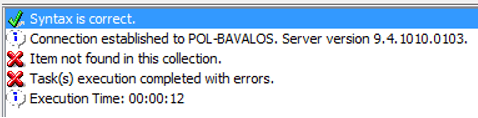
  1. Observe the error.

Item not found in this collection.
DSSError [Error][0x8004101B]
ka02R000000kVQSQA2_0EM44000000QDNM.png

 
CAUSE:
This is an identified defect that impacts Strategy 9.4.x.
 
ACTION:
A fix has been included in Strategy 10. Please update to this version to take advantage of the fix.
 
WORKAROUND:
The root cause of the issue is related to the Form Category being set to “None”. Changing this to “Date” or any other user defined Category will make the form to be successfully deleted.
 
KB439409


Comment

0 comments

Details

Knowledge Article

Published:

December 28, 2017

Last Updated:

December 28, 2017