Starting with the release of Strategy ONE (March 2024), dossiers are also known as dashboards.
With the release of Strategy Secure Enterprise 10.4 Hotfix 6 and 10.10 a new Compliance Dashboard has been included to allow for more in depth information on the usage of the Strategy environment. This new Dashboard or Dossier offers information about the current utilization of the Strategy system through a quick graphical view and includes in depth information about the User Details and Privileges. The Administrator of a Strategy deployment will be able to quickly understand the exact situation of the environment with a simple and meaningful Dashboard or Dossier.
The Home Page of the Dashboard or Dossier:
This will allow an Administrator to get a brief overview of their environment to ensure that nothing is out of place for the current status, and to understand how the environment can be expanded upon. At the very top of the screen a display will be given to show immediately how many accounts are enabled for the current license, how many are being used, as well as the number of contacts used throughout the active users in the environment. Below that details about the environment operating the Intelligence Server can be found for referencing the system capabilities, and CPU-based license affinity.
A utilization breakdown will appear that allows you to see how each of the portions of a Named User License is being accessed and naturally includes thresholds for at-a-glance knowledge of the whether the environment is exceeding the specifications. If the current License also includes the Reporter Module this will also have a display for that information in addition to the Intelligence Module License Overview.

The License Details:
The License Details page allows for drilling down into the precise nature of the environment when needed for determining exactly where and how aspects are being utilized. At the very top is a Graph for each of the Components of the Intelligence Module which will control the User components to allow for easy access to what users are included for what sections of the Product. From the User Details section it is possible to then further drill into the details by selecting specific users and being able to see what privileges that account has which cause it to use a Named User License, as well as how that privilege is being given to the Account.
This page of the Dossier or Dashboard also includes 2 additional sections for a different approach at understanding the system usage. The second section contains a matrix breakdown of all of the Accounts within the system and which products that account is currently a part of. The third section is equivalent to the first portion of the License Details for the new Reporter Module available in newer Licenses.
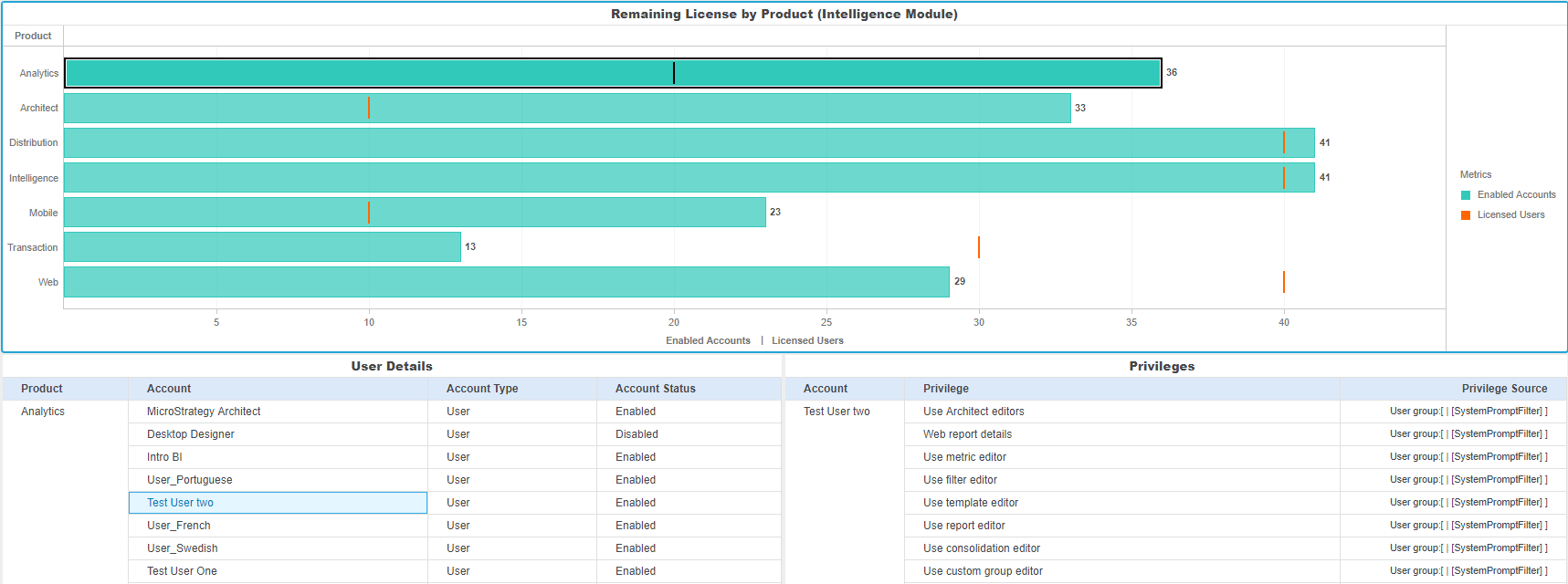
The Privilege Details:
The Privilege Details page of the Dashboard or Dossier allows for a clear reference as to which privileges are associates with which sections of the Product Licenses. The matrix will display the relationship between each of the Products that the privilege requires a Named User license for so that when building new users an Administrator can always be certain what they are granting to the new account.
With the introduction of the new Reporter Module a User can be a part of just the Reporter Module and no other sections of the Named User License. This is specific for any User who has specifically privileges within this category and no privileges outside of the category. This is a major distinction as for all of the other Product Sections they also are grouped with the Intelligence License. This means that a User who has just the 'Web User' privilege for example would be a Reporter, but if they were then given 'Use Architect editors' would no longer be a Reporter user but now be a Web, Intelligence, and Architect user.
Deployment:
The first step to taking advantage of this new Dashboard or Dossier in the Strategy deployment is the usage of an Object Manager mmp package. This package has been maintained as the ComplianceDashboard.mmp or ComplianceDossier.mmp depending on the version and when an environment is installed as 10.10 or upgraded to 10.10 and 10.4 Hotfix 6 will be included into the common location.
For default paths in a Windows environment this is the C:\Program Files(x86)\Common Files\MicroStrategy\ComplianceDashboard.mmp:

For the default paths in a Linux/UNIX environment this is /opt/MicroStrategy/ComplianceDashboard.mmp:

In order to bring this into an environment with an accessible Windows client machine the package can be utilized with the Object Manager utility, and if needed for Linux/UNIX the console tool mstrimportpackage can be used. In the following examples Object Manager was used on a Windows client and connected to a Linux 10.4 Hotfix 6 Intelligence Server. The Object Manager package will by default import the objects into the Public Objects, but may wish to be moved to a private location such as the 'My Personal Objects' directory for the Administrator account so that the Compliance Dashboard is not publicly accessible.

Once the package has been selected from the system the import option should be selected and Strategy Technical Support recommends also generating an Undo Package in the event that the removal of this is later desired. There will now be three additional objects in the environment, 2 Intelligent Cubes and one Dashboard or Dossier. For each of the Data Import Intelligent Cubes some information will need to be provided so that the Dashboard can build the finalized visualizations.
The first of these is the '1. Upload Audit Files' Data Import Intelligent Cube. This will prompt you for 6 different .csv files which are generated from License Manager. To generate these files we can open the License Manager application and select the new option 'Generate Audit Files' and this will create all of the needed .csv files. The generated files can then be selected for the Data Import and used to publish the first Intelligent Cube.

This export will create a series of six .csv files in the /Compliance_Dashboard sub-directory of the target location. The six different csv files should be 'account_privileges', 'lu_account', 'lu_privilege', 'lu_project_source_location', 'rel_product_privileges', 'system_info'.
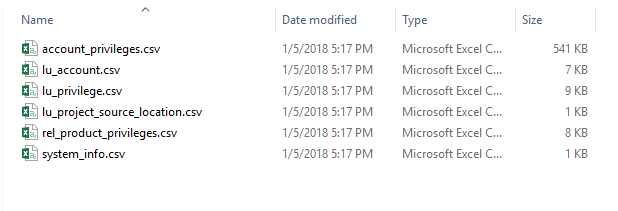
After receiving these files they can then be used with the first Data Import Intelligent Cube for publishing the information into the Strategy environment.

The second Intelligent Cube '2. Enter Purchased Licenses' requires the input about the License that has been received from the Strategy Account team. This will be delivered via an e-mail after the License is finalized and contain all of the details needed for this new Dashboard with the new License structure. To populate this information the details can be given using a custom data grid like the following:
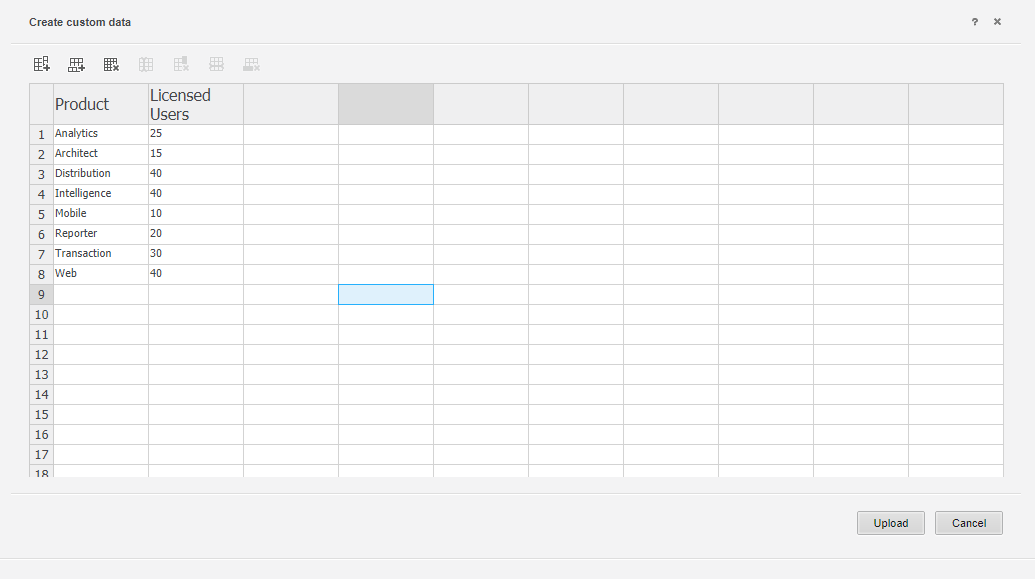
After both of these Intelligent Cubes have been published the new Compliance Dashboard is ready for use.
KB439437
