EducationSoftwareStrategy.com
StrategyCommunity

Knowledge Base

Product

Community

Knowledge Base

TopicsBrowse ArticlesDeveloper Zone

Product

Download SoftwareProduct DocumentationSecurity Hub

Education

Tutorial VideosSolution GalleryEducation courses

Community

GuidelinesGrandmastersEvents
x_social-icon_white.svglinkedin_social-icon_white.svg
Strategy logoCommunity

© Strategy Inc. All Rights Reserved.

LegalTerms of UsePrivacy Policy
  1. Home
  2. Topics

KB439452: {&Project} : Project Name shortcut is missing from the list of available shortcuts for the Sub-folder when creating a file subscription in MicroStrategy Web 10.0-10.9


Lukasz Wewior

Senior Lead, Technical Support • MicroStrategy


This article describes an issue with the {&Project} shortcut missing from the list of available shortcuts for the "Sub-folder" option when creating a file subscription in MicroStrategy Web 10.0-10.9. Also several other shortcuts are not on that list which were available in MicroStrategy Web 9.4.x.

SYMPTOM:
The {&Project} shortcut is missing from the list of available shortcuts for the "Sub-folder" option when creating a file subscription in Strategy Web 10.0-10.9. Also several other shortcuts are not on that list which were available in Strategy Web 9.4.x.
STEPS TO REPRODUCE:
1. Open any report and go to its subscription page.
2. Go to File subscription
3. Hover over the blue information icon of the Sub-folder option.
5. See that the "{&Project} : Project Name" shortcut is missing as well as several other shortcuts that were on that list in version 9.4.x.
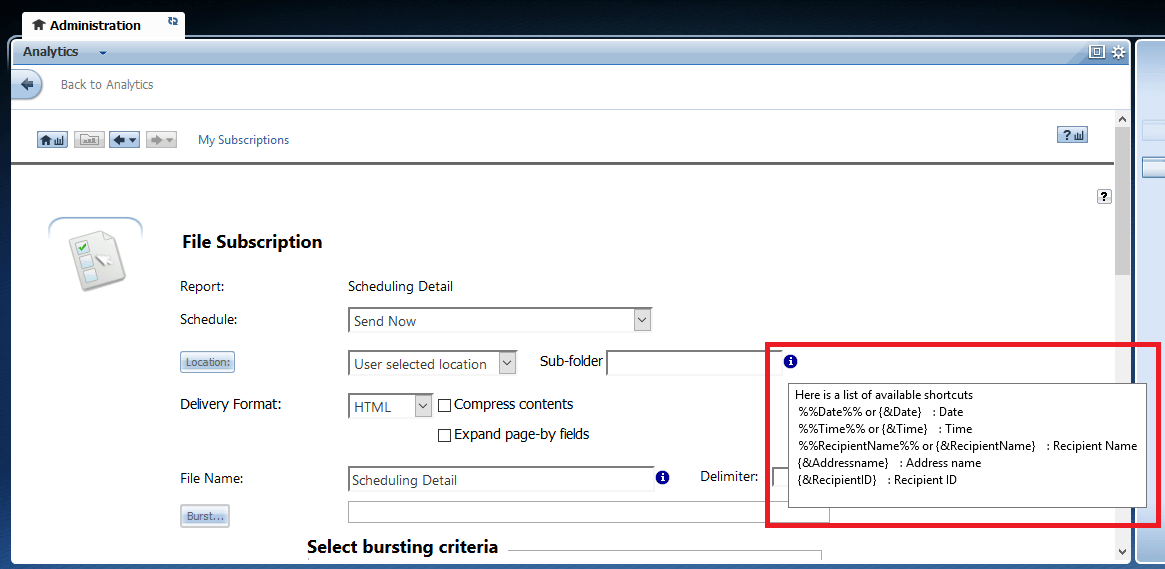
ka02R000000kUxNQAU_0EM44000000QDVu.png

CAUSE:
Lack of the {&Project} shortcut from that list was classified as a defect; however, all the other shortcuts that seem missing ({&UserLogin}, {&Subscription}, {&Prompt1&}, {&ContentName} and {&ContentDetails}) when comparing Strategy Web 10.x to 9.4.x were intentionally removed, as they are not supported for the Sub-Folder option.
ACTION:
The lack of that {&Project} shortcut was addresses in Strategy 10.10 and 10.4.6.  KB439452


Comment

0 comments

Details

Knowledge Article

Published:

December 31, 2017

Last Updated:

January 1, 2019