SYMPTOM
When executing the setup.sh file for a new 10.10 installation on Oracle Linux 7.X the following message will be encountered:

Checking for running instances.......done.
The Strategy installer program requires Linux RedHat 6.0 or SuSE 11 to run
This message is distinct from "The Strategy installer program requires Linux RedHat 6.0 or SuSE 11 to run." as separate commands call both sections within the Strategy installer.
STEPS TO REPRODUCE
1. Download and unpack the Strategy 10.10 installation package on Oracle Linux 7.
2. Execute the setup.sh script to begin the Strategy 10.10 Secure Enterprise installation.
CAUSE
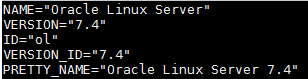
This issue is caused by a known issue identified by Strategy from differences in the /etc/os-release file of Oracle Linux.
ACTION
This issue is being reviewed and fixed by the Strategy Technology team, for an update on that investigation, please contact Strategy Technical Support and reference DE84581
WORKAROUND
While this issue is being resolved in order to install Strategy Secure Enterprise 10.10 on an Oracle Linux 7.X environment the additional flag '-nocheck' can be used with the setup.sh file to allow for successful installation with both GUI and console executions. './setup.sh -nocheck'
KB439473
