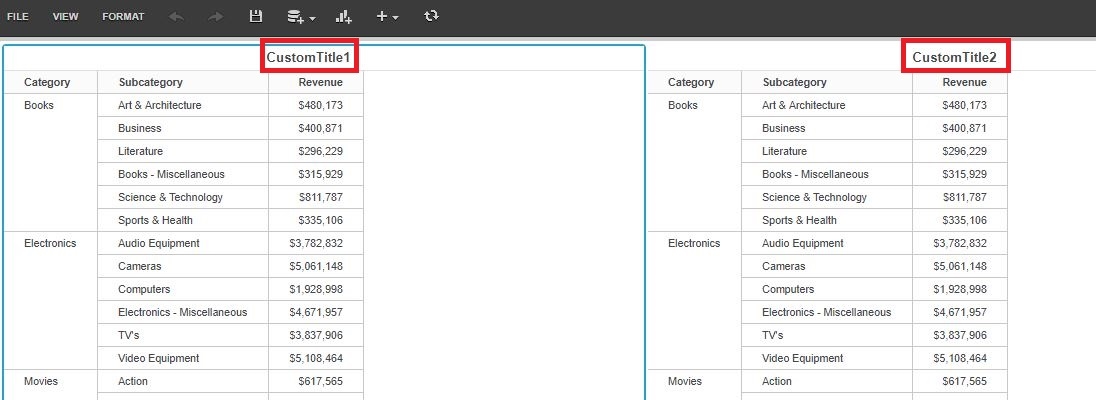
The following code sample shows how to get the Title of a Grid on a Visual Insight dashboard in Strategy Web using Web SDK:
package com.Strategy.sdk.standalone;

import com.Strategy.web.beans.BeanFactory;
import com.Strategy.web.beans.RWBean;
import com.Strategy.web.beans.WebBeanException;
import com.Strategy.web.objects.WebFormat;
import com.Strategy.web.objects.WebFormatIterator;
import com.Strategy.web.objects.WebIServerSession;
import com.Strategy.web.objects.WebObjectsException;
import com.Strategy.web.objects.WebObjectsFactory;
import com.Strategy.web.objects.rw.EnumRWUnitTypes;
import com.Strategy.web.objects.rw.RWDefinition;
import com.Strategy.web.objects.rw.RWGridGraphDef;
import com.Strategy.web.objects.rw.RWInstance;
import com.Strategy.web.objects.rw.RWUnitDef;
import com.Strategy.webapi.EnumDSSXMLApplicationType;

public class test {

private static WebObjectsFactory factory = null;
     private static WebIServerSession serverSession = null;
     public static void main(String[] args) throws WebObjectsException, IllegalArgumentException, WebBeanException {

        if (serverSession == null) {
               // create factory object
               factory = WebObjectsFactory.getInstance();
               serverSession = factory.getIServerSession();
                // Set up session properties
               serverSession.setServerName("SERVERNAME"); // Should be replaced with the name of an Intelligence Server
               serverSession.setServerPort(0);
               serverSession.setProjectName("PROJECTNAME"); // Project where the session should be created
               serverSession.setLogin("USERNAME"); // User ID
               serverSession.setPassword("PASSWORD"); // Password
               serverSession.setApplicationType(EnumDSSXMLApplicationType.DssXmlApplicationCustomApp);

        }
        String docID = "B3393A5A4A4F549123C530905441E690";

         RWBean rwBean = (RWBean) BeanFactory.getInstance().newBean("RWBean");
         rwBean.setSessionInfo(serverSession);
         rwBean.setObjectID(docID);
         rwBean.collectData();

         RWInstance rwInstance = rwBean.getRWInstance();
         rwInstance.setAsync(false);

         RWDefinition oDef = rwInstance.getDefinition();

         // Get Grid units within the VI dashboard:
         RWUnitDef[] rwUnitDefs = oDef.findUnitsByType(EnumRWUnitTypes.RWUNIT_GRIDGRAPH);

// Loop through all Grid objects in the document
         for (int i = 0; i < rwUnitDefs.length; i++) {
           RWUnitDef rwUnit = rwUnitDefs[i];
           RWGridGraphDef gridDef = (RWGridGraphDef) rwUnit;

   // Get the formatting properties of the grid
   WebFormat format = gridDef.getFormat();

   // Iterate through formatting properties if needed.
   //WebFormatIterator wfi = format.getIterator();
           //while(wfi.nextPropertySet()){
        //     System.out.println("Property Name Set " + wfi.getPropertySetName());
        //     while(wfi.nextProperty()){
        //      System.out.println("-----Property Name " + wfi.getPropertyName());
        //     }
        //    }

   // Output the title of the Visualization:
           System.out.println("Title: " + format.getValue("FormattingView", "Title"));
         }
     }
}