EducationSoftwareStrategy.com
StrategyCommunity

Knowledge Base

Product

Community

Knowledge Base

TopicsBrowse ArticlesDeveloper Zone

Product

Download SoftwareProduct DocumentationSecurity Hub

Education

Tutorial VideosSolution GalleryEducation courses

Community

GuidelinesGrandmastersEvents
x_social-icon_white.svglinkedin_social-icon_white.svg
Strategy logoCommunity

© Strategy Inc. All Rights Reserved.

LegalTerms of UsePrivacy Policy
  1. Home
  2. Topics

KB43961: Threshold does not change metric values from red to white when metric values are displayed in red and the threshold is supposed to display in white with red background in MicroStrategy Developer


Stefan Zepeda

Salesforce Solutions Architect • Strategy


This article notes an issue with threshold formatting

SYMPTOM:
A user creates a report with a metric whose values are either fixed red or currency negative red. The user then creates a threshold to display the red metric values as white font color with a red background.
 
STEPS TO REPRODUCE:
1. In tutorial, please copy the revenue metric to create a new revenue metric that is negative.
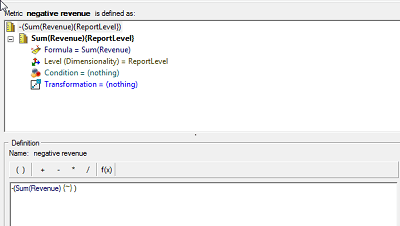
 

ka02R000000kZKaQAM_0EM440000002Cjk.png

 
2.  Create a report with the attributes revenue and category as well as the -Revenue metric from step 1.
 
3. Set the Metric values to currency and use the red negative option for the negative value display.
 

ka02R000000kZKaQAM_0EM440000002Cjo.png

 
4. Create a threshold with the below parameters. Set the font color to white and the background color to solid red.
 
5. Notice that the metric values and background are both red.
 

ka02R000000kZKaQAM_0EM440000002Cjj.png

CAUSE:
This is a known issue with Strategy Developer 10.x.
 
ACTION:
Currently this issue is being reviewed by Strategy for a potential code fix on an upcoming Strategy release. For negative currency values, use the black negative option.
 
WORKAROUND:
Avoid using a threshold that applies a red background to red font.


Comment

0 comments

Details

Knowledge Article

Published:

June 20, 2017

Last Updated:

June 20, 2017