The error message: "Your login has been denied by the system. We are not able to complete the authentication" comes back when a user attempts to login to Strategy Library for the first time after it was deployed and configured automatically by the Express Install option. Note that this message is specific to the Express Install option.
View the image for the specific error message:

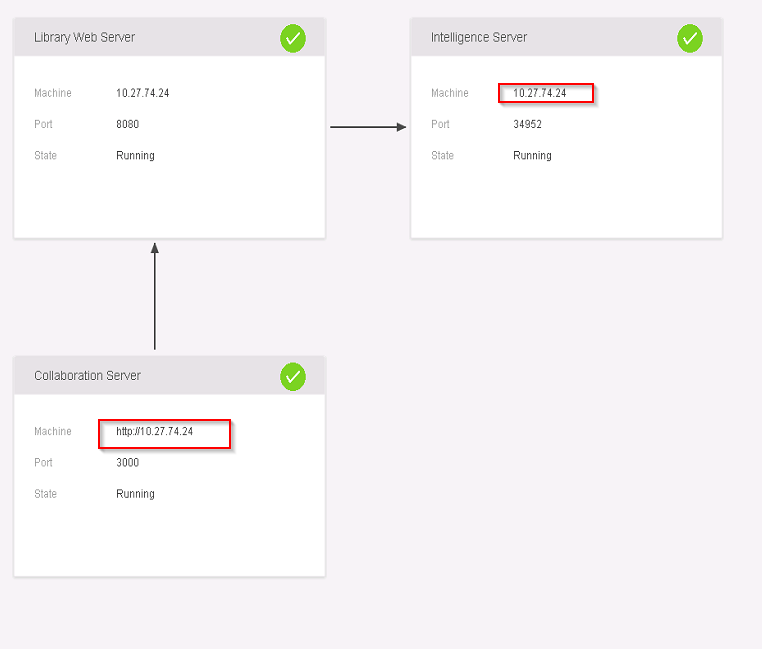
One of the typical causes for this issue is the fact that the product was installed to be a template for a Virtual Machine system. With that, the machine name appears updated when a new VM is cloned based on the template image. The outdated machine names can be seen on Library Admin page when the connection cannot be established.
View the image below to see the outdated machine names:

Note: The Library Administration page by default is:
http://<FQDN or IP>:PortNumber/MicroStrategyLibrary/admin.
C:\Program Files (x86)\Common Files\MicroStrategy\Tomcat\apache-tomcat-8.0.30\webapps\MicroStrategyLibrary\WEB-INF\classes\config\configOverride.properties

Still having troubles? Feel free to start a discussion on Community or create a case with your Support liaison.
Want to learn more about your Intelligence Architecture? Visit the Learning Center on the Community for tutorial videos and more!
For more on Library administration, check out our Education course: 11.311 Administration for Enterprise Analytics.
