EducationSoftwareStrategy.com
StrategyCommunity

Knowledge Base

Product

Community

Knowledge Base

TopicsBrowse ArticlesDeveloper Zone

Product

Download SoftwareProduct DocumentationSecurity Hub

Education

Tutorial VideosSolution GalleryEducation courses

Community

GuidelinesGrandmastersEvents
x_social-icon_white.svglinkedin_social-icon_white.svg
Strategy logoCommunity

© Strategy Inc. All Rights Reserved.

LegalTerms of UsePrivacy Policy
  1. Home
  2. Topics

KB439635: In MicroStrategy Web 10.4, running a dashboard using Live Connect with custom groups in the filter panel all columns are queried for the associated tables leading to ‘Loading Data …’ when there is a big volume of data.


Community Admin

• Strategy


This knowledge base article describes a defect when running a dashboard with custom groups.

SYMPTOM:
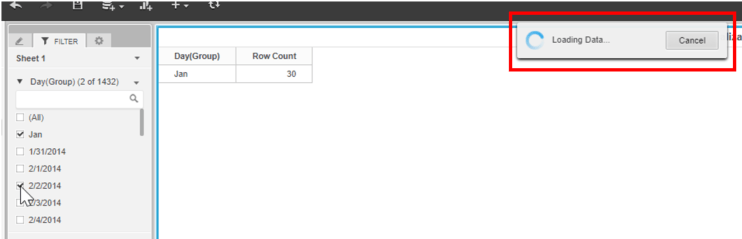
In Strategy Web 10.4, when running a Visual Insight Dashboard using Live Connect with custom group in the filter panel and unselecting one custom group filter item, users see ‘Loading Data …’ when there is a big volume of data and the report may not come back in a timely manner.
ka04W000000ObBAQA0_0EM44000000YVpE.png

CAUSE: 
​This is a known defect in Strategy Web 10.4 using Live Connect in Visual Insight.  This is caused due to Strategy querying all columns from all tables when adjusting the filtering for custom group elements. 
ACTION:
This issue has been fixed in Strategy 10.9. Now, only the required columns and tables are queried when changing the filtering for custom groups in a Visual Insight Dashboard.
Strategy reference numbers for this technical note are KB439635 and DE53646. KB439635


Comment

0 comments

Details

Knowledge Article

Published:

February 8, 2018

Last Updated:

January 8, 2019