EducationSoftwareStrategy.com
StrategyCommunity

Knowledge Base

Product

Community

Knowledge Base

TopicsBrowse ArticlesDeveloper Zone

Product

Download SoftwareProduct DocumentationSecurity Hub

Education

Tutorial VideosSolution GalleryEducation courses

Community

GuidelinesGrandmastersEvents
x_social-icon_white.svglinkedin_social-icon_white.svg
Strategy logoCommunity

© Strategy Inc. All Rights Reserved.

LegalTerms of UsePrivacy Policy
  1. Home
  2. Topics

KB439649: Metric calculates differently with filter on attribute elements and attribute group elements in MicroStrategy Web 10.7 and above


Tianfeng (Jimmy) Jiang

Quality Engineer, Principal • MicroStrategy


In MicroStrategy 10.8 and earlier versions, a level metric whose relationship with the report filter is "Ignore" does not return correct values when filtered by an attribute group in Connect Live mode. This issue has been worked on over time, and the complete fix can be found in the latest versions of MicroStrategy with Data Engine Version set to 11 or above.

Starting with the release of Strategy ONE (March 2024), dossiers are also known as dashboards.
SYMPTOM:

  • Derived metric returns incorrect values when filtered on derived elements.
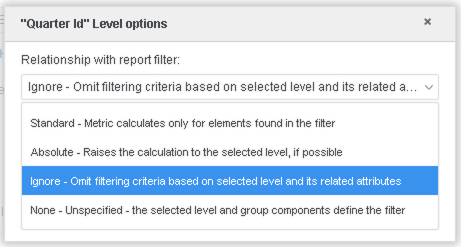
    • Its level is defined by another attribute, and the relationship with the report filter is set as "Ignore".
    • This issue occurs consistently when using datasets made in Connect Live mode.

GLOSSARY:

  • Derived Elements - grouping of attribute elements
  • Connect Live - mode of data access that retrieves results directly from the data source

STEPS TO REPRODUCE:

  • Open Strategy Web.
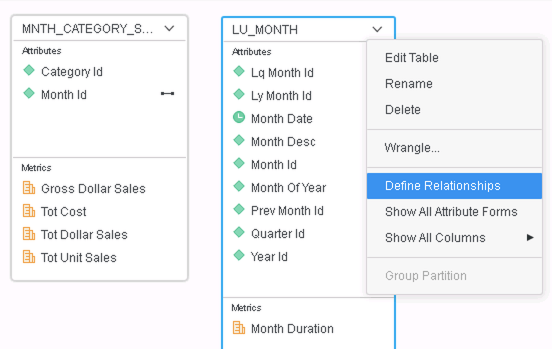
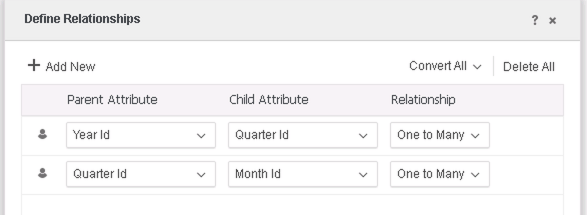
  • Use Strategy Tutorial objects to create a new dataset with the "MNTH_CATEGORY_SLS" and "LU_MONTH" tables, and define relationships for "LU_MONTH": 
ka0PW0000001JZ0YAM_0EM2R000000lmGS.jpeg
ka0PW0000001JZ0YAM_0EM2R000000lmGX.jpeg
  • Save the dataset as "Connect Live".
  • Create a new dossier.
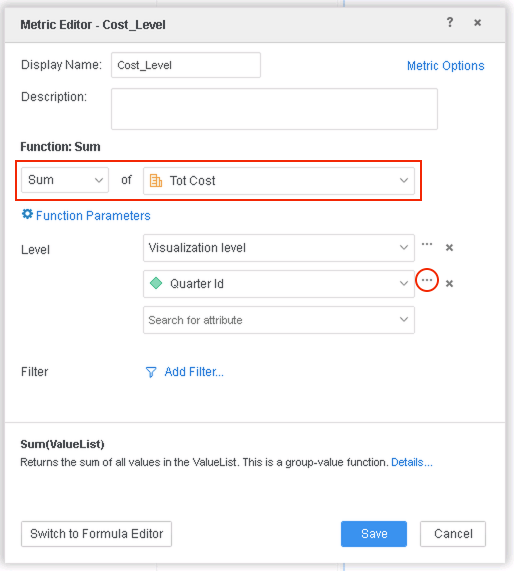
  • Create a new metric Cost_Level:
ka0PW0000001JZ0YAM_0EM2R000000lmFo.jpeg
ka0PW0000001JZ0YAM_0EM2R000000lmFK.jpeg
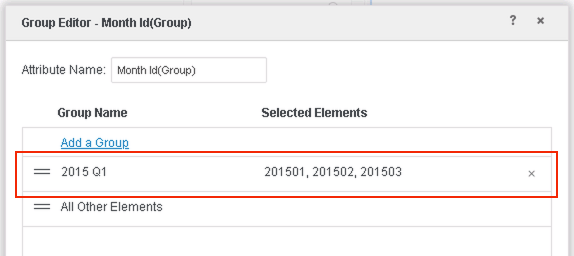
  • Create one attribute element grouping with Month Id. 
ka0PW0000001JZ0YAM_0EM2R000000lmFe.jpeg
  • Add Year Id, Cost and Cost_Level to a Grid visualization.
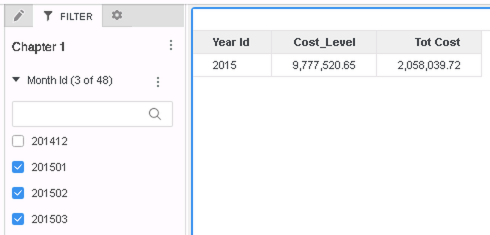
  • Add Month Id to filter and select elements "201501, 201502, 201503" as shown below. Note that the filter on Month Id is ignored by the Cost_Level metric as expected.
ka0PW0000001JZ0YAM_0EM2R000000lmFy.jpeg
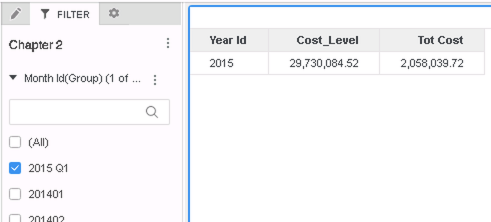
  • Remove Month Id from the filter panel. Add Month Id(Group) to the filter and select element "2015 Q1". Note how the metric Cost_Level returns different values from the previous step: 
ka0PW0000001JZ0YAM_0EM2R000000lmp8.jpeg

CAUSE:
This is a known issue in Strategy 10.8 and previous versions.

  • The attribute level is not correctly ignored when an attribute group is used in the filter. 

ACTION:
This issue has been fixed in Strategy Web 10.9 and later versions. After upgrading, follow the additional steps below:

  • If you are upgrading to Strategy 11.0 or above:
    • Enable project level setting "Data Engine Version" to 11 or above. This property can only be enabled through Workstation. For more details on enabling the setting, refer to Change Data Engine Version.
  • If you are upgrading to Strategy 10.9 / 10.10 / 10.11:
    • Enable the Feature Flag "Defect fixes that may impact Data, SQL, MDX, CSI" within the Web Preferences -> Project Defaults. For more details on enabling Feature Flags refer to What are the Feature Flag options and what do they accomplish in MicroStrategy Web 10.8 and up. Starting Strategy 11.0, this Feature Flag is removed and replaced with project level setting called "Data Engine Version".


After the fix, the example above should return when filtered by Month Id(Group):
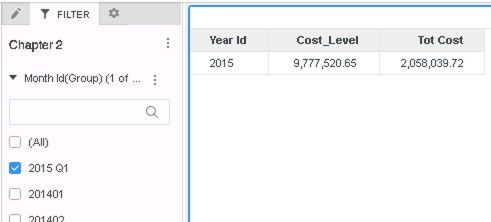
ka0PW0000001JZ0YAM_0EM2R000000lmpI.jpeg

Strategy reference numbers for this technical note are KB439649 and DE68437 / DE76761.


Comment

0 comments

Details

Knowledge Article

Published:

February 9, 2018

Last Updated:

March 21, 2024