Starting with the release of Strategy ONE (March 2024), dossiers are also known as dashboards.
SYMPTOM
Users are unable to open the Online Web Help, set up as locally, within a Dossier creation despite having all required privileges to do so.
However, accessing directly the Web Help in the tab under Administrator from multi-language URLs works fine, such as English US (Lang_1033) and Norwegian (Lang_1044):
https://localhost/MicroStrategy/help/WebUser/WebHelp/Lang_1033/Content/Welcome.htm
https://localhost/MicroStrategy/help/WebUser/WebHelp/Lang_1044/Content/Welcome.htm
In order to set up Strategy Web help documentation on a local server, please read the following knowledge base article.
https://community.Strategy.com/s/article/KB43242-How-to-install-Strategy-Web-and-Mobile-help
STEPS TO REPRODUCE
1. Set up the Help location locally, under Web Administrator -> Other Configurations.
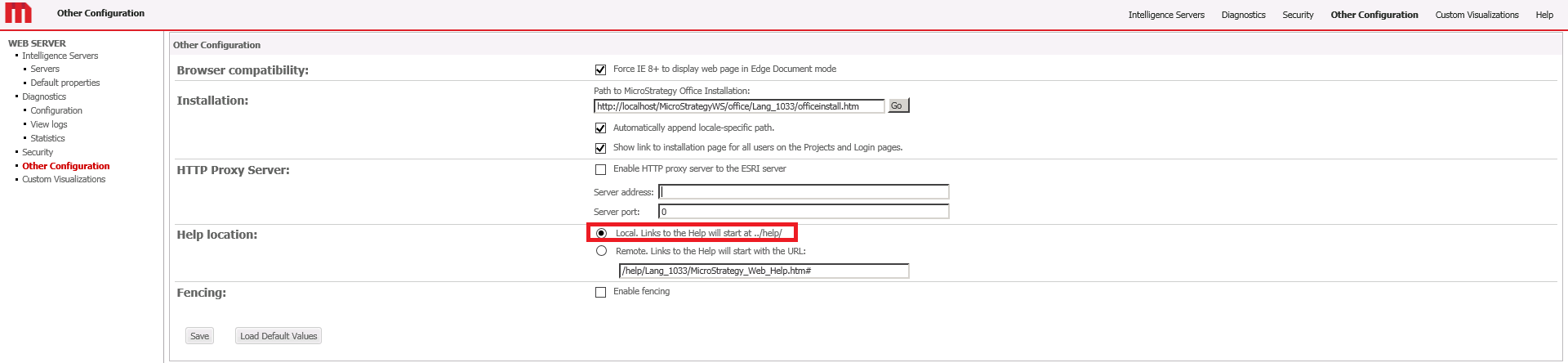
2. Create a Dossier.
3. Access the Online Help.
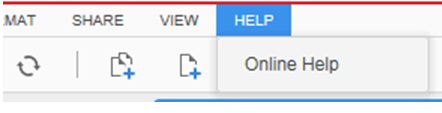
4. Strategy Web Help does not open, and the URL changes, as:
https://localhost/MicroStrategy/help/Dossier_Authoring/WebHelp/Lang_1033/index.htm
5. Edit the file sys_defaults.xml under the following path:
C:\Program Files (x86)\MicroStrategy\Web ASPx\WEB-INF\xml
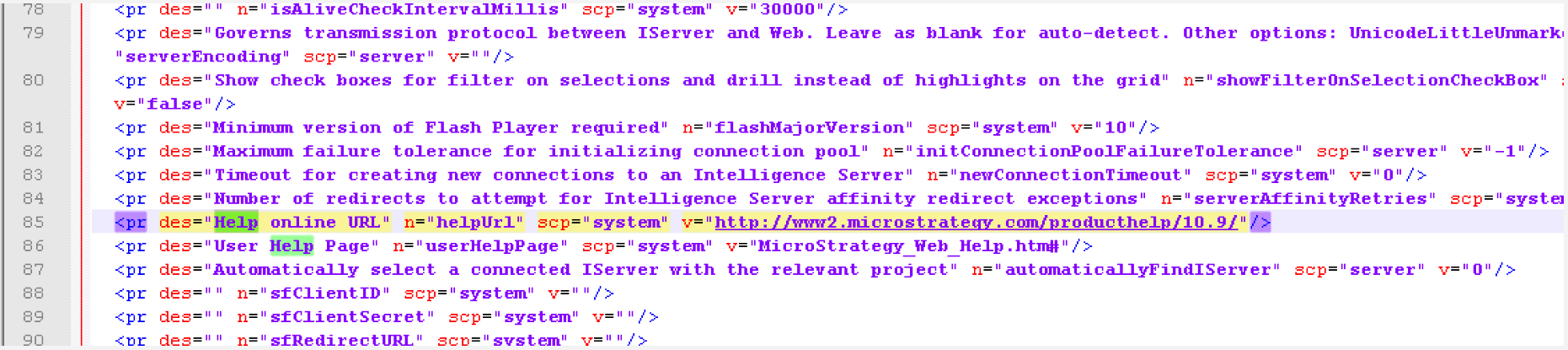
And replace the highlighted section ‘v’ by the relative path needed, e.g,: https://localhost/MicroStrategy/help/WebUser/WebHelp/Lang_1044/Content/Welcome.htm
6. Reset the IIS
7. Repeat steps 2 and 3.
CAUSE
This is an identified defect in Strategy 10.9, 10.10 and 10.11 that has been already fixed.
Root cause of this defect is that the offline package downloaded for 10.9, as per the aforementioned KB43242, is not a full version of help files, as only English and folder structure changed, not including other languages files.
For 10.9, 10.10 and 10.11, it only contains the files under "WebUser/WebHelp/Lang_1033/....". To make them work, users need to manually add these path folders to make them work, since our code on Web and dossier are fixed for these path structure.
More important is 10.9 is the 1st introduction of Dossier. And online help added a new folder “Dossier_Authoring" to contain all new dossier authoring features related help files.
For example, an online link will be:
http://www2.Strategy.com/producthelp/10.9/Dossier_Authoring/WebHelp/Lang_1033/Content/About_Strategy_Desktop.htm
This will require the download package also contains this folder.
So, to fix, two new packages for 10.9 and 10.10 with all necessary files/folders included are needed to be added. Then upload them to download site to replace the old.
Each package should contain at least all these folders for Web and Dossier authoring:
/Dossier_Authoring/WebHelp/Lang_****/
/WebUser/WebHelp/Lang_****/
/manuals/WebHelp/Lang_****/
/WebAdmin/WebHelp/Lang_****/
ACTION
Currently this issue has been fixed by Strategy. Local hosting of these help files are working fine with 10.9 and 10.10 GA environment. French, German, Italian, Spanish, Brazilian, Portuguese, Chinese simplified, Korean and Japanese are the languages supported. For the Web help, Swedish and Danish are also supported.
WORKAROUND
The current workaround is to download the new Strategy Web Help package available in the Strategy Download site, https://software.microstrategy.com/download/
KB439656
