SYMPTOM:
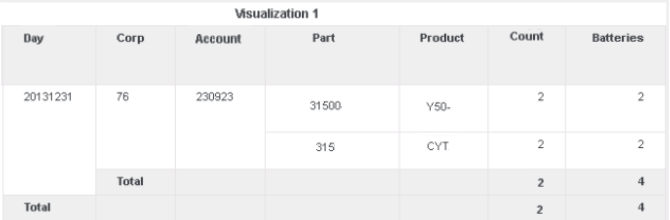
Subtotal dimensionality becomes incorrect when adding additional attributes into a grid using datablending in Strategy 10.4 and above. Suppose one dashboard contains two datasets linking to each other with Day attribute. There is a level metric Count which contains attributes Part and Product as the dimensionality. Grouping of both levels is set None. The following grid shows correct result as shown below: Notice the Count metric subtotal remains 2 per the dimensionality set.
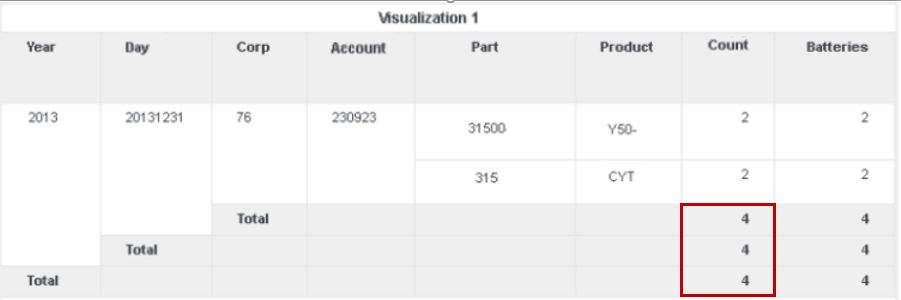
Add attribute Year into the grid. The dimensionality of the Count metrics subtotal becomes incorrect. The value changes from 2 to 4 while it should be still 2.
CAUSE:
This is a known issue in Strategy 10.4 and above.
ACTION:
This issue has been fixed in Strategy 10.9.
If you are upgrading to Strategy 11.0 or above, to pick up the fix, enable project level setting "Data Engine Version" to 11. This property can only be enabled through Workstation. For more details on enabling the setting, refer to Change Data Engine Version.
If you are upgrading to Strategy 10.9 / 10.10 / 10.11: To pick up the fix, enable the Feature Flag "Defect fixes that may impact Data, SQL, MDX, CSI" within the Web Preferences -> Project Defaults. For more details on enabling Feature Flags refer to What are the Feature Flag options and what do they accomplish in MicroStrategy Web 10.8 and up. Starting Strategy 11.0, this Feature Flag is removed and replaced with project level setting called "Data Engine Version".
Strategy reference numbers for this technical note are KB439659 and DE68652.
