SYMPTOM:
In Strategy 10.8 and earlier, when adding a template level metric condition to a document which is created off of an Intelligent Cube using 'Live' connection, the template level metric condition is ignored and returns incorrect results.
STEPS TO REPRODUCE:
M1 = Rank(Max<UseLookupForAttributes=False>([Item Id]){~+})

M2 = Rank(Max<UseLookupForAttributes=False>([Order Id]){~+})


M3 = M2/M1
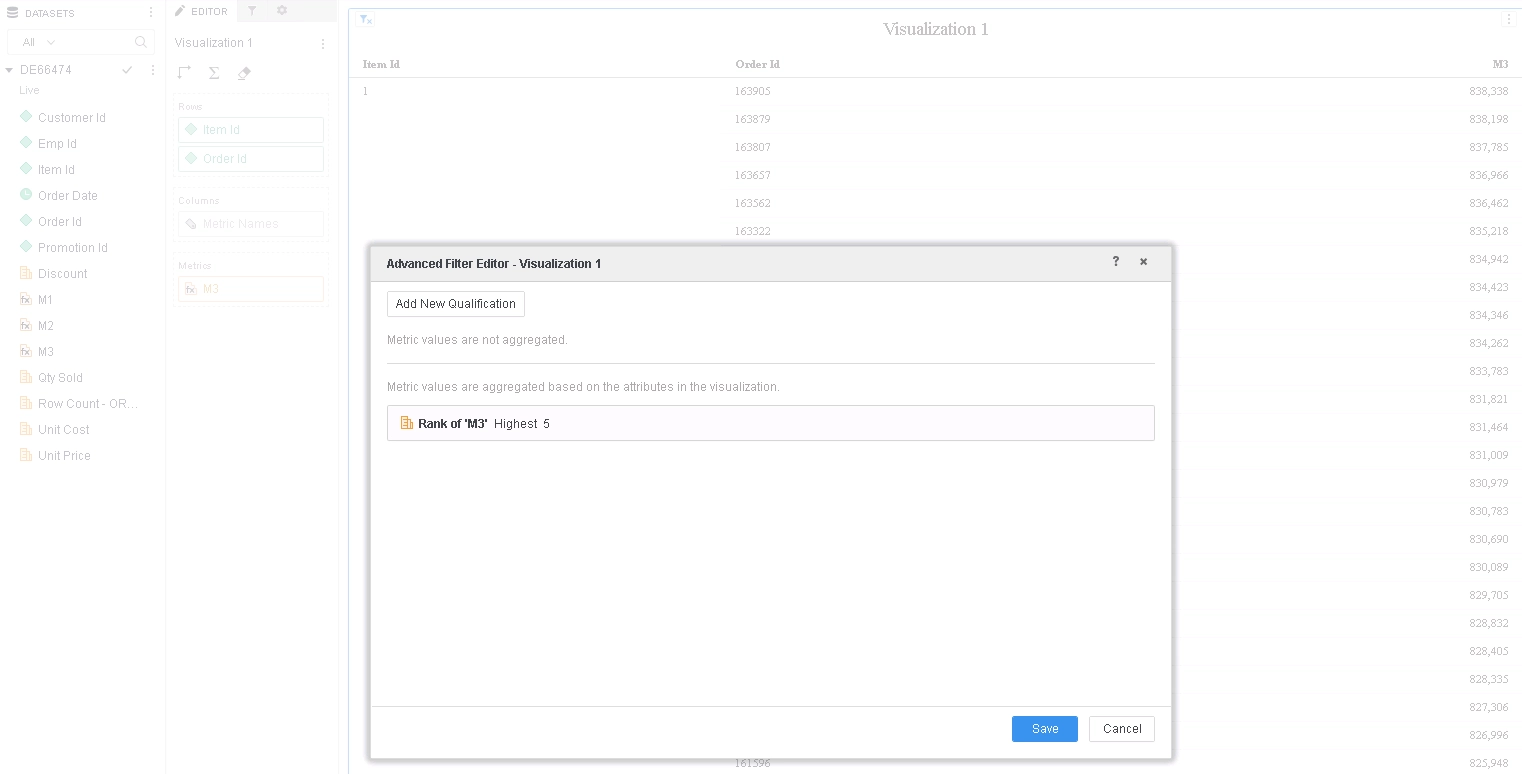
Choose Query Details... from grid menu and note that template level metric condition is not applied (in red below).
Pass0 - Query Pass Start Time: 10/15/2018 3:57:30 PM
Query Pass End Time: 10/15/2018 3:57:35 PM
Query Execution: 0:00:00.00
Data Fetching and Processing: 0:00:05.56
Data Transfer from Datasource(s): 0:00:05.23
Other Processing: 0:00:00.06
Rows selected: 838787
select a11.ORDER_ID ORDER_ID,
a11.ITEM_ID ITEM_ID,
(rank () over( order by max(a11.ORDER_ID) asc nulls last) / (CASE WHEN rank () over( order by max(a11.ITEM_ID) asc nulls last)=0 THEN NULL ELSE rank () over( order by max(a11.ITEM_ID) asc nulls last) END)) WJXBFS1
from T177MQWH.ORDER_DETAIL a11
group by a11.ORDER_ID,
a11.ITEM_ID
Pass1 - Query Pass Start Time: 10/15/2018 3:57:35 PM
Query Pass End Time: 10/15/2018 3:57:36 PM
Query Execution: 0:00:00.00
Data Fetching and Processing: 0:00:00.00
Data Transfer from Datasource(s): 0:00:00.00
Other Processing: 0:00:00.59
[Populate Report Data]
[Analytical engine calculation steps:
1. Perform cross-tabbing
]
to DE66474_2
************ Individual Step End ************
************ Individual Step Start ************
Number of Rows Returned: 838787
Time Spent: 0.526 sec(s)
Query Execution Start Time: 10/15/2018 4:03:13 PM
Query Execution End Time: 10/15/2018 4:03:13 PM
select [Order Id]@[ORDER_ID],
[Item Id]@[ITEM_ID],
[M3] as [M3]
from DE66474_2
************ Individual Step End ************
CAUSE: This is a known issue in Strategy 10.8 and earlier using 'Live' Intelligent Cubes.
ACTION: This issue has been fixed in Strategy 10.9 and above. The template level metric condition on Aggregate From Base derived metrics have been corrected, so it is no longer is ignored during Data Blending.
If you are upgrading to Strategy 11.0 or above, to pick up the fix, enable project level setting "Data Engine Version" to 11. This property can only be enabled through Workstation. For more details on enabling the setting, refer to Change Data Engine Version.
If you are upgrading to Strategy 10.9 / 10.10 / 10.11: To pick up the fix, enable the Feature Flag "Defect fixes that may impact Data, SQL, MDX, CSI" within the Web Preferences -> Project Defaults. For more details on enabling Feature Flags refer to What are the Feature Flag options and what do they accomplish in MicroStrategy Web 10.8 and up. Starting Strategy 11.0, this Feature Flag is removed and replaced with project level setting called "Data Engine Version".
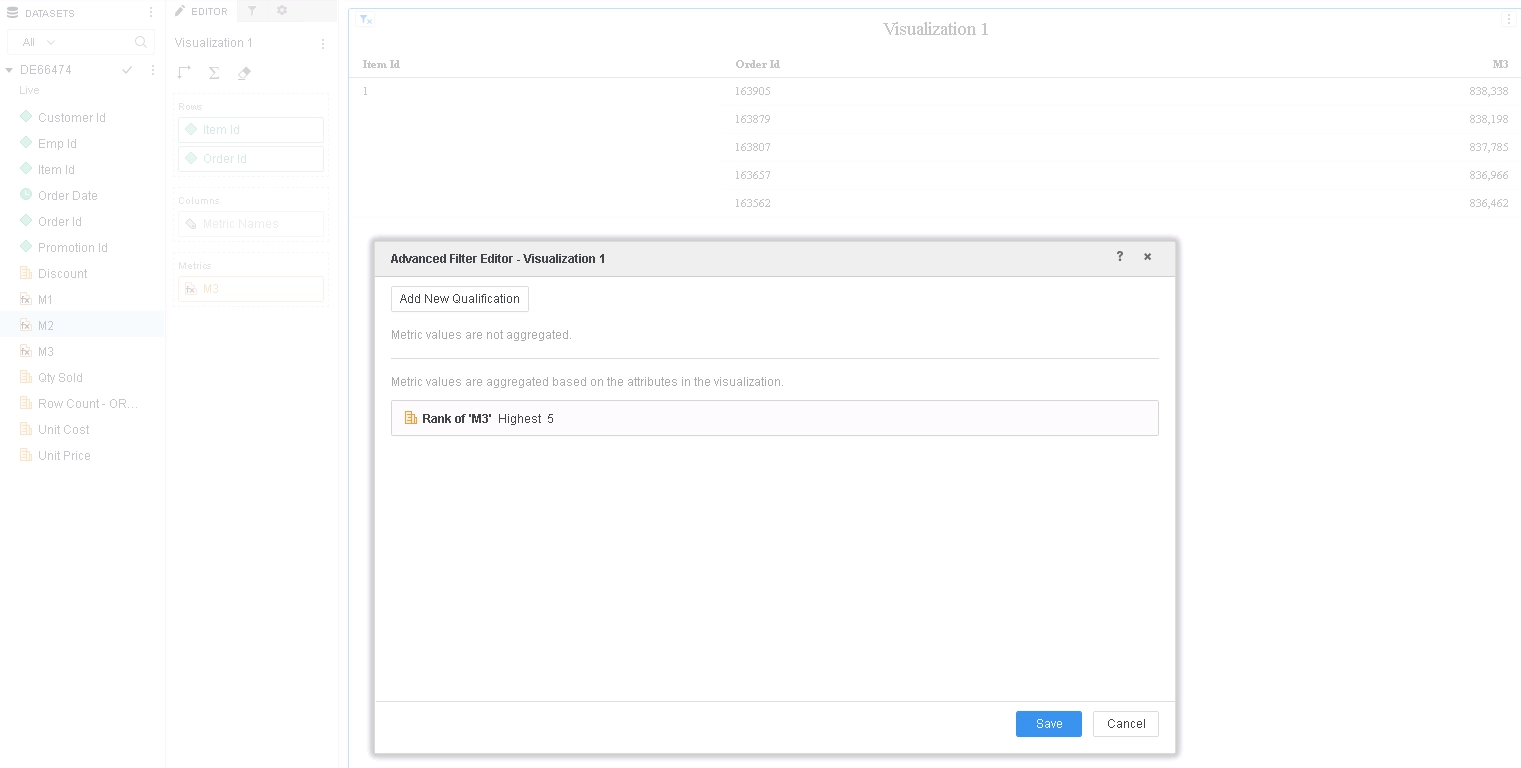
Choose Query Details... from grid menu and note that template level metric condition is not applied (in blue below).
Pass0 - Query Pass Start Time: 10/15/2018 4:05:29 PM
Query Pass End Time: 10/15/2018 4:05:35 PM
Query Execution: 0:00:00.00
Data Fetching and Processing: 0:00:05.81
Data Transfer from Datasource(s): 0:00:05.46
Other Processing: 0:00:00.05
Rows selected: 838787
select a11.ORDER_ID ORDER_ID,
a11.ITEM_ID ITEM_ID,
(rank () over( order by max(a11.ORDER_ID) asc nulls last) / (CASE WHEN rank () over( order by max(a11.ITEM_ID) asc nulls last)=0 THEN NULL ELSE rank () over( order by max(a11.ITEM_ID) asc nulls last) END)) WJXBFS1
from T177MQWH.ORDER_DETAIL a11
group by a11.ORDER_ID,
a11.ITEM_ID
Pass1 - Query Pass Start Time: 10/15/2018 4:05:35 PM
Query Pass End Time: 10/15/2018 4:05:35 PM
Query Execution: 0:00:00.00
Data Fetching and Processing: 0:00:00.00
Data Transfer from Datasource(s): 0:00:00.00
Other Processing: 0:00:00.67
[Populate Report Data]
[Analytical engine calculation steps:
1. Perform cross-tabbing
]
to DE66474_0
************ Individual Step End ************
************ Individual Step Start ************
Number of Rows Returned: 5
Time Spent: 0.218 sec(s)
Query Execution Start Time: 10/15/2018 4:05:36 PM
Query Execution End Time: 10/15/2018 4:05:36 PM
select [Order Id]@[ORDER_ID],
[Item Id]@[ITEM_ID],
[M3] as [M3]
from DE66474_0
having Rank<ASC=False>([M3]) <= 5
************ Individual Step End ************
WORKAROUND
Make M3 a smart metric by unchecking "Aggregate from Base" from Metric Options.
Strategy internal reference number for this technical note is KB439660 and DE66474.
