EducationSoftwareStrategy.com
StrategyCommunity

Knowledge Base

Product

Community

Knowledge Base

TopicsBrowse ArticlesDeveloper Zone

Product

Download SoftwareProduct DocumentationSecurity Hub

Education

Tutorial VideosSolution GalleryEducation courses

Community

GuidelinesGrandmastersEvents
x_social-icon_white.svglinkedin_social-icon_white.svg
Strategy logoCommunity

© Strategy Inc. All Rights Reserved.

LegalTerms of UsePrivacy Policy
  1. Home
  2. Topics

KB440399: Is it possible to convert Document to CSV file using Microstrategy Web version 10.2?


Community Admin

• Strategy


The KB answer to the question about the possibility to convert Document to CSV file using Microstrategy Web version 10.2

Usually the documents cannot be easily transformed to CSV, as there might be graphic elements and different grids of different size. It is not trivial how would the export to CSV in general look like.
On the document we can enable the possibility to export a single grid. Just enable the export button for the grid.
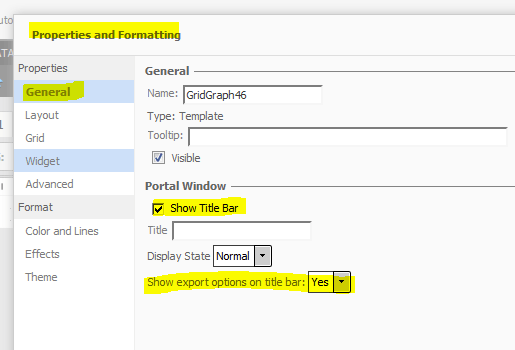
ka04W000000Ob1jQAC_0EM44000000A6Ak.png

RESOLUTION
This option to export single grids will be convenient. Unfortunately, this could not work if there is one grid which is going one after another without any blank spaces. In this situation there is only one possibility: convert document to Excel and then convert this Excel to CSV.
  KB439671


Comment

0 comments

Details

Knowledge Article

Published:

March 28, 2018

Last Updated:

December 18, 2018