SYMPTOM:
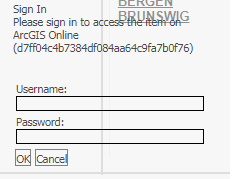
Users will intermittently receive the below login dialogue in a Visual Insight dashboard with an ESRI map:

The login box may also appear slightly differently:
STEPS TO REPRODUCE:
1. Run a Visual Insight dashboard with an ESRI map visualization and wait for everything to render.
2. Wait 30-50 minutes or until the system timeout has been hit.
3. Log back into Strategy via the pop-up dialogue.
4. User will see "Sign In Please sign in to access the item on ArcGIS Online d7ff04c4b7384df...).
ACTION:
This issue has been addressed in 10.6 and 10.4 HF2. Upgrade to one of these versions to take advantage of the fix.
The reference number for this KB Article is
KB439679
