EducationSoftwareStrategy.com
StrategyCommunity

Knowledge Base

Product

Community

Knowledge Base

TopicsBrowse ArticlesDeveloper Zone

Product

Download SoftwareProduct DocumentationSecurity Hub

Education

Tutorial VideosSolution GalleryEducation courses

Community

GuidelinesGrandmastersEvents
x_social-icon_white.svglinkedin_social-icon_white.svg
Strategy logoCommunity

© Strategy Inc. All Rights Reserved.

LegalTerms of UsePrivacy Policy
  1. Home
  2. Topics

KB439682: In MSTR Office, Pivot Table option does not display negative values in Excel in MicroStrategy


Community Admin

• Strategy


This Knowledge Base article describes when some users try to run a grid report as a Pivot Table in excel and that report contains negative values instead of displaying them there is an empty field.

SYMPTOM
When running a grid report as a Pivot Table in Strategy Office 10.4 in Excel, negative numbers will not be displayed in the Pivot Table, but they will display if the report is run as a grid, as shown below.

ka04W000000ObEsQAK_0EM44000000WIt2.jpeg

 
STEPS TO REPRODUCE
Follow these steps to reproduce the issue in a Strategy Tutorial Project.

  1. In Strategy Developer, create a metric that returns "negative" values, for example
    
    (Cost * -1)

  2. Create a new report with this metric and add an attribute, such as Country.
  3. Go to Strategy Office, and find the newly created report.
  4. Right-click > Run Report to Pivot Table.
  5. In Excel, the negative values will not display at all.

CAUSE
This is an identified defect in Strategy Office 10.4.
ACTION
Currently, this issue is still being reviewed for feasibility by our Technology team and it is not scoped for any upcoming scheduled Strategy release.
WORKAROUND
To avoid the issue, a registry key will need to be created. Follow this steps:
For Linux, go to:


SOFTWARE\MicroStrategy\DSS Suite\

For Windows x64 bit, go to:

HKEY_LOCAL_MACHINE\SOFTWARE\Wow6432Node\MicroStrategy\DSS Suite\
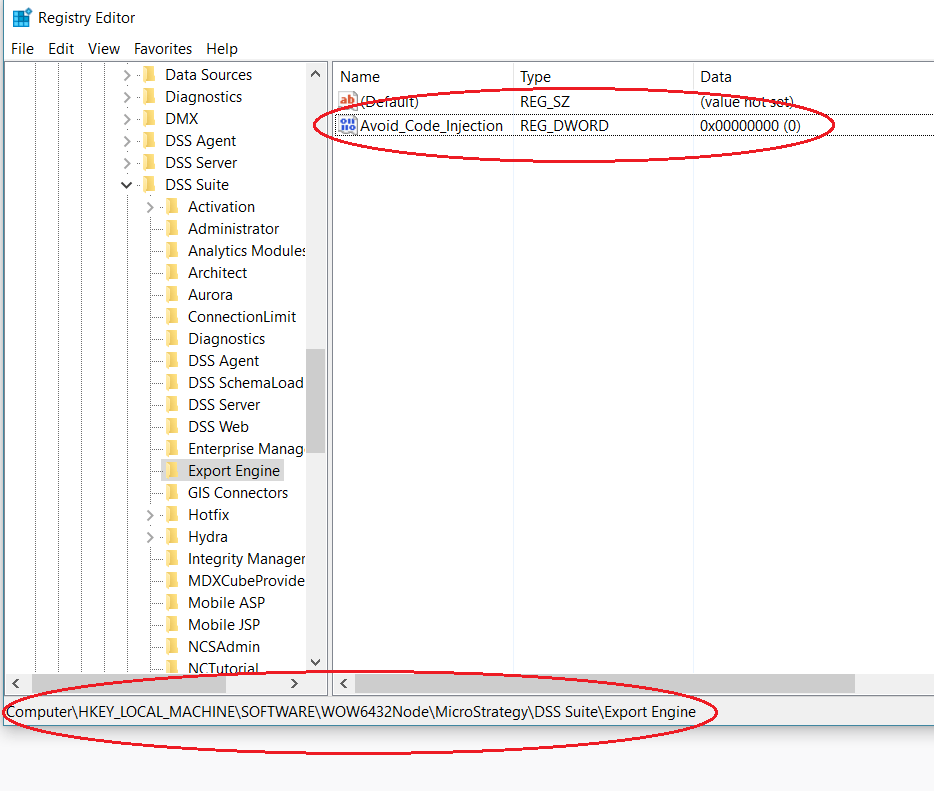
  • Create a new key under this folder, called: Export Engine.
  • Create a new DWORD inside the Export Engine key, with the following name: Avoid_Code_Injection.
  • Set the value of the DWORD to 0, as shown below:
ka04W000000ObEsQAK_0EM44000000WQiH.png

Note: The Registry key for Export Engine should be applied on i-server machine. 
 
The Strategy Internal Reference Number for this issue is: KB439682


Comment

0 comments

Details

Knowledge Article

Published:

February 14, 2018

Last Updated:

March 21, 2019