Starting with the release of Strategy ONE (March 2024), dossiers are also known as dashboards.
SYMPTOM
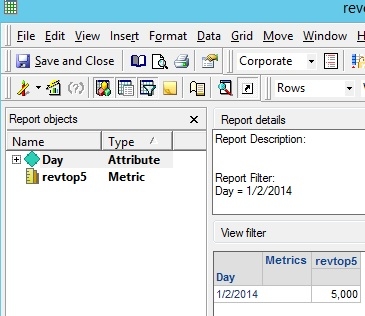
Metrics with metric qualification filters behave differently between being added to reports and dashboards/dossiers directly when additional filters are added in Strategy 10.x. Different metric values are seen despite identical filters being used. The example below uses a metric with a condition defined as a metric set qualification of top 5 items by revenue along with a day filter.
Report:
Dossier:
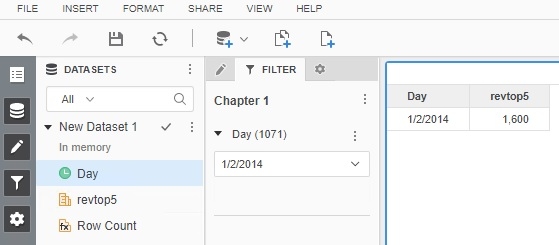
As you can see in the above dossier, the value for the same revtop5 metric is smaller. This is happening because the metric qualification and report filter are being merged.
CAUSE
Dashboard/Dossier filters are not directly equivalent to report filters. This means the metric qualification option to apply additional filters can apply to report filters but not to dossier filters so the metric qualification returns a different set of 5 items. With this issue, the Strategy engine decides whether to merge the metric qualification with the report filter using different logic.
ACTION
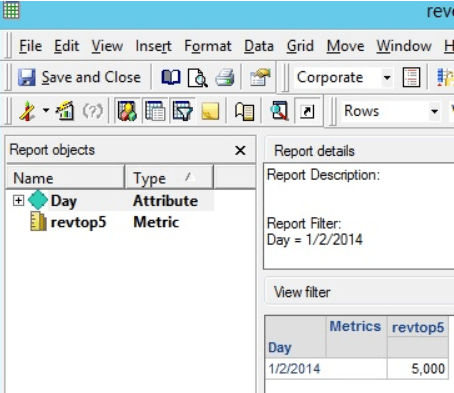
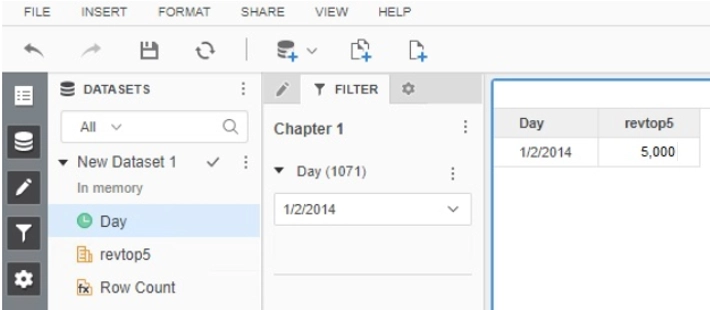
This issue has been addressed in Strategy 10.9 and above.
If you are upgrading to Strategy 11.0 or above, to pick up the fix, enable project level setting "Data Engine Version" to 11. This property can only be enabled through Workstation. For more details on enabling the setting, refer to Change Data Engine Version.
If you are upgrading to Strategy 10.9 / 10.10 / 10.11: To pick up the fix, enable the Feature Flag "Defect fixes that may impact Data, SQL, MDX, CSI" within the Web Preferences -> Project Defaults. For more details on enabling Feature Flags refer to What are the Feature Flag options and what do they accomplish in MicroStrategy Web 10.8 and up. Starting Strategy 11.0, this Feature Flag is removed and replaced with project level setting called "Data Engine Version".
Report:
Dossier:
WORKAROUND
There are a couple of options to get the desired behavior.
Option 1) When using with metric qualifications and additional filters, use fully defined datasets.
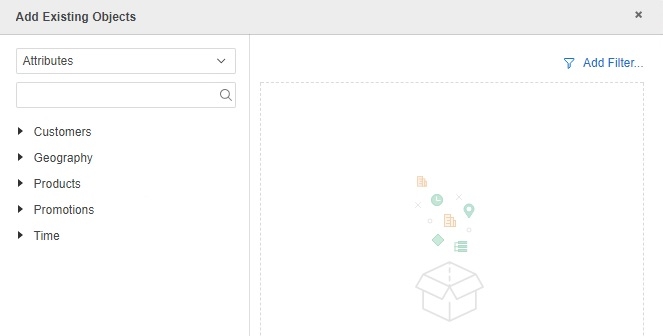
Option 2) Define the filter when adding objects inside a Strategy 10.x Dossier per the "add filter" button seen in the top right of the below screenshot.
Strategy internal reference number for this technical note is KB439692 and DE64146.
KB439692
