EducationSoftwareStrategy.com
StrategyCommunity

Knowledge Base

Product

Community

Knowledge Base

TopicsBrowse ArticlesDeveloper Zone

Product

Download SoftwareProduct DocumentationSecurity Hub

Education

Tutorial VideosSolution GalleryEducation courses

Community

GuidelinesGrandmastersEvents
x_social-icon_white.svglinkedin_social-icon_white.svg
Strategy logoCommunity

© Strategy Inc. All Rights Reserved.

LegalTerms of UsePrivacy Policy
  1. Home
  2. Topics

KB439720: “An error has occurred on this page. ()” error occurs when running document in editable mode with edit links.


Community Admin

• Strategy


This Knowledge Base article addresses an identified defect with running documents in editable mode that contains edit links passing prompts dynamically.

SYMPTOM:
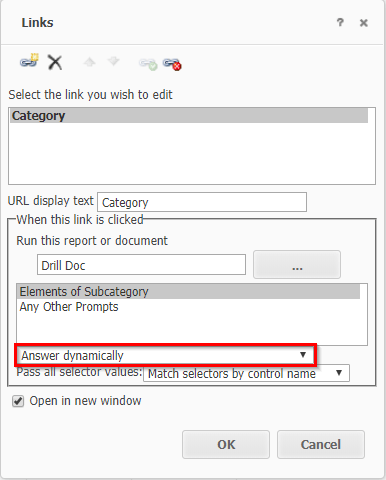
In Strategy 10.4 Hotfix 6, an error is seen when using editable mode for a document that contains edit links passing prompts dynamically.


“An error has occurred on this page. ()”
 
STEPS TO REPRODUCE:
1. Setup 2 documents (the source and target). Target document should have a report with an element prompt.
2. In the Source document add a grid and create edit link to the target document passing prompts dynamically.

ka04W00000148mGQAQ_0EM44000000YTHP.png

3. Run in presentation mode and notice that the document renders without any issue.
4. Run in editable mode and notice the document either does not render or the below error is seen.


“An error has occurred on this page. ()”
 
CAUSE:
This is an identified defect and has been logged to our Technology team. The Strategy Internal Reference number is DE88338.
 
ACTION:
This issue has been addressed in Strategy 10.4 Hotfix 7 and 10.11.
 
WORKAROUND:
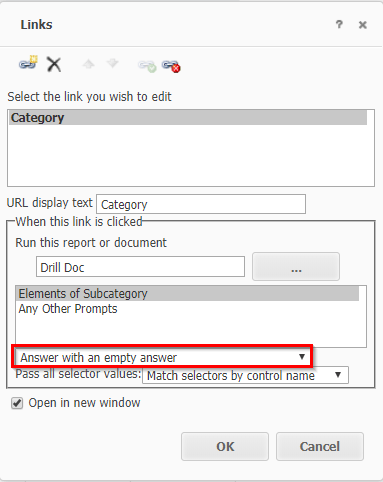
Define prompts to “Answer with an empty answer”. This will allow the document to run in editable mode.

ka04W00000148mGQAQ_0EM44000000YTHU.png

  KB439720


Comment

0 comments

Details

Knowledge Article

Published:

February 16, 2018

Last Updated:

December 31, 2018