EducationSoftwareStrategy.com
StrategyCommunity

Knowledge Base

Product

Community

Knowledge Base

TopicsBrowse ArticlesDeveloper Zone

Product

Download SoftwareProduct DocumentationSecurity Hub

Education

Tutorial VideosSolution GalleryEducation courses

Community

GuidelinesGrandmastersEvents
x_social-icon_white.svglinkedin_social-icon_white.svg
Strategy logoCommunity

© Strategy Inc. All Rights Reserved.

LegalTerms of UsePrivacy Policy
  1. Home
  2. Topics

KB439749: When adding personal views in MicroStrategy Web with a prompt prompt values are replaced.


Community Admin

• Strategy


This Knowledge Base article describes how some users may be confused by the behavior when combining prompt values with person views

SYMPTOM
When using a prompted report by adding a view filter and saving the report as a personal view some users may experience a results they did not expect.
STEPS TO REPRODUCE
TS case 220480 - steps to reproduce

  1. Create an Intelligent Cube that contains e.g. Category and Day attributes and base a report on it in Strategy 10.3 (HF2 in this case)
  2. Create an element prompt of Day and add it to the filter of the above report.
  3. Run the report choosing some day in the prompt (e.g. 1/1/2014).
  4. Save a personal view of that selection.
  5. Edit your personal view clicking the edit icon in the subscription folder and choose a different prompt answer there (e.g. 1/2/2014):
ka04W000000ObJ0QAK_0EM44000000YTsu.png
  1. Run your personal view from the subscriptions folder and see that your new prompt answer was correctly reflected in the filter window and in the report’s grid:
ka04W000000ObJ0QAK_0EM44000000YTsz.png
  1. Follow the same 1 to 6. steps, but now add a view filter on Category to show e.g. only Books (in point 3.) and save this report as another personal view.
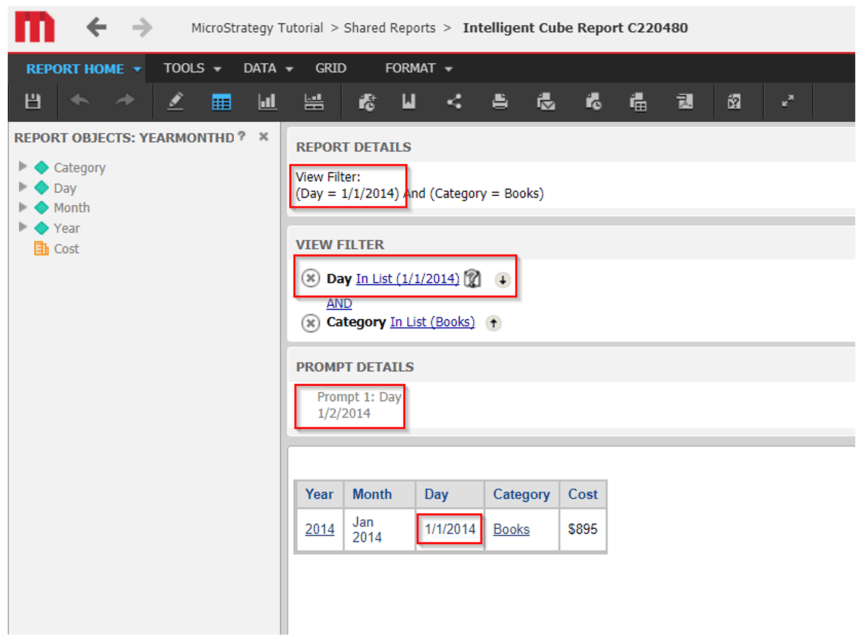
  2. Edit your personal view clicking the edit icon in the subscription folder and choose a different prompt answer (e.g. 1/2/2014) – you will see that now only in the prompt window the new date is reflected, but not in the view filter window nor in the report’s grid. This behavior was reported by BBVA as an issue.
ka04W000000ObJ0QAK_0EM44000000YTt4.png
  1. Below is a screenshot of MSTR 10.4.5 not only does the issue happen when you add the Category view filter, but also without it.
ka04W000000ObJ0QAK_0EM44000000YTt9.png

CAUSE
This is working as designed as the current workflow is: 
1. Server side will firstly call the function to resolve / apply the prompt answers and then launch a job to run the report.
2. The manipulations are applied to the report when trying to persist the job result. Therefore, the prompt answer that is recorded in the manipulations will take effect.
WORKAROUND
A possible workaround is to use "Reprompt" to change the prompt answers.
If we don’t apply the prompt before the report manipulations, there could be manipulations that will fail due to unresolved document definition.
  KB439749


Comment

0 comments

Details

Knowledge Article

Published:

February 22, 2018

Last Updated:

March 31, 2019