The following are best practices when creating custom visualizations so that they work on both Strategy Web and Mobile
{url: (mstrApp.getPluginsRoot && mstrApp.getPluginsRoot() || "../plugins/")+"<plugin name>/javascript/mojo/js/source/<library file name>.js"}<jsBundle name="CustomVisBase" depSort="true" inherits="mojo-coreui" minify="true">
<jsDir path="javascript/mojo/js/source">
<jsFile name="CustomVisBase.js" />
<jsFile name="VisUtility.js" />
<jsFile name="array.js" />
<jsFile name="DocPortlet.js" />
<jsFile name="boxmodel.js" />
<jsFile name="num.js" />
<jsFile name="dom.js" />
<jsFile name="hash.js" />
<jsFile name="color.js" />
<jsFile name="css.js" />
<jsFile name="Box.js" />
<jsFile name="string.js" />
<jsFile name="func.js" />
<jsFile name="VisEnum.js" />
<jsFile name="VisMenuList.js" />
<jsFile name="_HasMarkup.js" />
<jsFile name="DocModel.js" />
</jsDir>
<jsDir path="javascript/mojo/js/source/Refine/">
<jsFile name="DateTimeUtil.js" />
</jsDir>
<jsDir path="javascript/mojo/js/source/models/template">
<jsFile name="DataInterface.js" />
</jsDir>
<jsDir path="javascript/mojo/js/source/vi/models/editors">
<jsFile name="CustomVisEditorModel.js" />
</jsDir>
<jsDir path="javascript/mojo/js/source/vi/models">
<jsFile name="CustomVisDropZones.js" />
</jsDir>
<jsDir path="javascript/mojo/js/source/ui">
<jsFile name="_HasScroller.js" />
</jsDir>
<jsDir path="javascript/mojo/js/source/mstr">
<jsFile name="EnumFunction.js" />
</jsDir>
<jsDir path="javascript/mojo/js/source/chart/model/enums">
<jsFile name="EnumDSSObjectType.js" />
</jsDir>
<jsDir path="javascript/mojo/js/source/chart/enums">
<jsFile name="EnumFontStyle.js" />
</jsDir>
<jsDir path="javascript/mojo/js/source/models">
<jsFile name="FormatModel.js" />
</jsDir>
<jsDir path="javascript/mojo/js/source/vi/ui">
<jsFile name="DatasetUnitMenuUtils.js" />
</jsDir>
</jsBundle>
</jsBundles>
<style>
* {
	-webkit-touch-callout: none;
	-webkit-user-select: none;
}
</style>
-webkit-user-selectis provided by WKWebview.
#inputfield_div > * {
  -webkit-user-select: auto !important;
}nputfield_div` is the input field element id in the plugin. This css setting will override the
-webkit-user-select propertyfor the specific input field element.
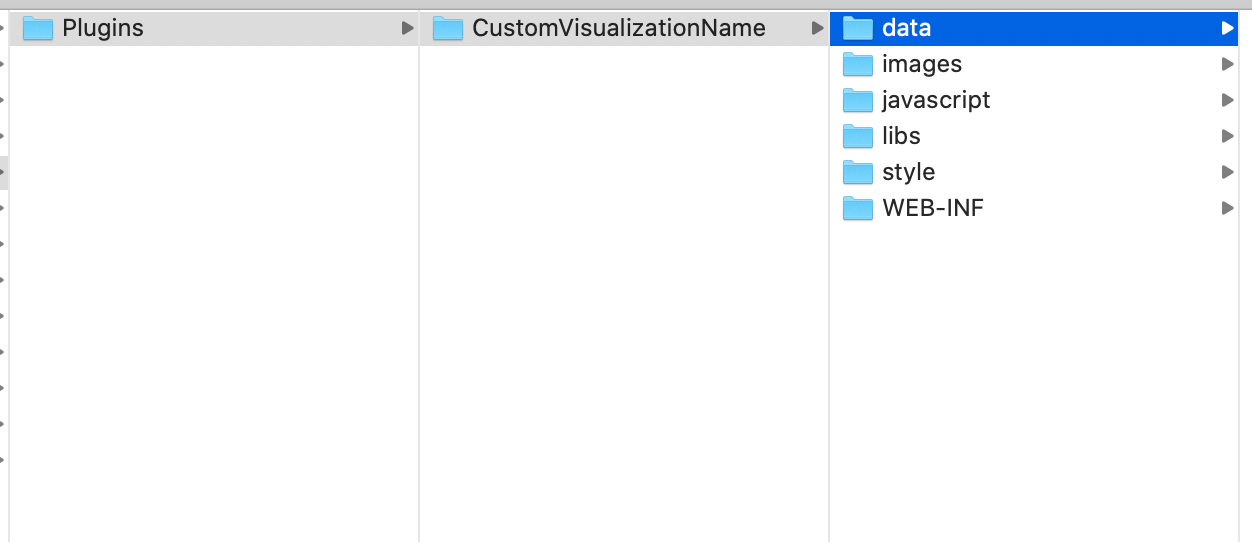
Plugins/<CustomVisualizationName>/javascript: This is for the plugin's main Javascript files.
Plugins/<CustomVisualizationName>/libs: This is for the plugin's referenced internal/external libraries.
Plugins/<CustomVisualizationName>/images: This is for the plugin's image files, like 'png', 'jpeg', etc.
Plugins/<CustomVisualizationName>/styles: This is for CSS style files.
Plugins/<CustomVisualizationName>/data: This is for data files, like 'JSON' data.
ADDITIONAL INFORMATION:
The Strategy SDK allows you to customize the standard Strategy Web interface, and extend and integrate the Strategy business intelligence functionality into other applications. However, before changing the way Strategy Web products look or behave, it is helpful to understand how the application is built. For more information regarding the Strategy Web architecture or the process of customizing Strategy Web, please refer to Strategy Developer Zone (https://resource.microstrategy.com/msdz/).
Customization Warning:
This customization is provided as a convenience to Strategy users and is only directly applicable to the version stated. While this code may apply to other releases directly, Strategy Technical Support makes no guarantees that the code provided will apply to any future or previous builds. In the event of a code change in future builds, Strategy Technical Support makes no guarantee that an updated version of this particular customization will be provided. For enhancements to this customization or to incorporate similar functionality into other versions, contact your Account Executive to inquire about Strategy Consulting assistance.
Disclaimers and Limitation of Liabilities
Disclaimer:The utility application is provided "as is" and without warranty of any kind. Strategy Expressly disclaims all warranties, express, implied or statutory, including, without limitation, the implied warranties of merchantability, fitness for a particular purpose, satisfactory quality and noninfringement.
Limitation of Liability: Strategy shall have no liability to licensee for any damages of any kind, including, but not limited to, liability for direct, indirect, special, incidental or consequential, damages (which shall include, but not be limited to, loss of data or information, loss of revenue or anticipated profits or lost business).
Third Party Software Installation: WARNING:
The third-party product(s) discussed in this technical note is manufactured by vendors independent of Strategy. Strategy makes no warranty, express, implied or otherwise, regarding this product, including its performance or reliability.
KB439757
