EducationSoftwareStrategy.com
StrategyCommunity

Knowledge Base

Product

Community

Knowledge Base

TopicsBrowse ArticlesDeveloper Zone

Product

Download SoftwareProduct DocumentationSecurity Hub

Education

Tutorial VideosSolution GalleryEducation courses

Community

GuidelinesGrandmastersEvents
x_social-icon_white.svglinkedin_social-icon_white.svg
Strategy logoCommunity

© Strategy Inc. All Rights Reserved.

LegalTerms of UsePrivacy Policy
  1. Home
  2. Topics

KB439761: How to create Freeform SQL report to call DB2 procedures with input and output parameters and dynamic result sets in MicroStrategy Developer 10.x


Tianfeng (Jimmy) Jiang

Quality Engineer, Principal • MicroStrategy


This document shows how to create Freeform SQL report to call DB2 procedures with input and output parameters and dynamic result sets in MicroStrategy Developer 10.x

DB2 stored procedures support input, output parameters and dynamic result sets. The following steps show how to create a Freeform SQL report to call such procedure in Strategy Developer 10.x:

  • Create the sample table and insert sample data with SQL statements below in DB2 database:
    
    CREATE TABLE lu_employee (emp_id int, emp_name varchar(20), emp_title varchar(30));
    
    INSERT INTO lu_employee VALUES (111, 'Jimmy', 'Support Engineer');
    
    INSERT INTO lu_employee VALUES (222, 'Peter', 'Support Engineer');

  • Create sample stored procedure with input and output parameter and dynamic result sets. The following sample procedure contains one input (employee_id) and one output (querytime) parameter and one dynamic result set. 
    
    CREATE PROCEDURE  read_emp(in employee_id int, out querytime timestamp)
      SPECIFIC read_emp
      LANGUAGE SQL 
      DYNAMIC RESULT SETS 1
    
      R1:  BEGIN
    
          SET querytime=CURRENT TIMESTAMP;
    
          C1: BEGIN
             DECLARE c_emp CURSOR WITH RETURN FOR
                  SELECT emp_name, emp_title
                  FROM lu_employee
                  WHERE emp_id= employee_id;
             OPEN c_emp;
           END C1;
    
      END R1;

  • Create one variable to hold the output parameter from procedure:
    
    CREATE VARIABLE example TIMESTAMP;
    
    SET example = CURRENT TIMESTAMP ;

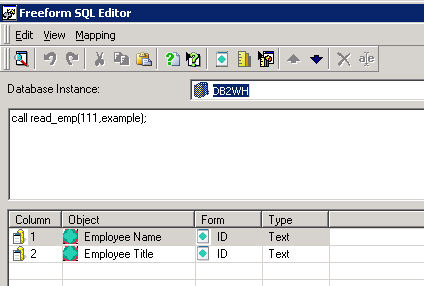
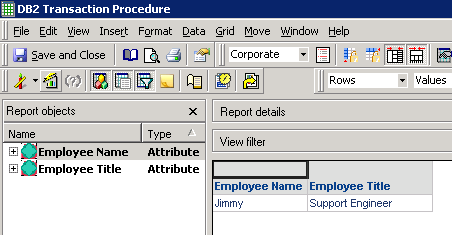
  • In Strategy Developer, create one Freeform SQL report with SQL below:
    
    CALL read_emp(111,example);

         
ka02R000000kV4oQAE_0EM44000000YUFK.png
ka02R000000kV4oQAE_0EM44000000YUFF.png


KB439761


Comment

0 comments

Details

Knowledge Article

Published:

February 23, 2018

Last Updated:

November 29, 2018