EducationSoftwareStrategy.com
StrategyCommunity

Knowledge Base

Product

Community

Knowledge Base

TopicsBrowse ArticlesDeveloper Zone

Product

Download SoftwareProduct DocumentationSecurity Hub

Education

Tutorial VideosSolution GalleryEducation courses

Community

GuidelinesGrandmastersEvents
x_social-icon_white.svglinkedin_social-icon_white.svg
Strategy logoCommunity

© Strategy Inc. All Rights Reserved.

LegalTerms of UsePrivacy Policy
  1. Home
  2. Topics

KB439766: Error “SQLEngine got an Exception from DFC: [DFCENGINE] Engine Logic: The column %1's datataype %2 with precision %3 scale %4 is not supported.” occurred when trying to execute a report or cube using specific table in MicroStrategy 10.x


Min Zheng

Senior Manager, Cloud Support • MicroStrategy


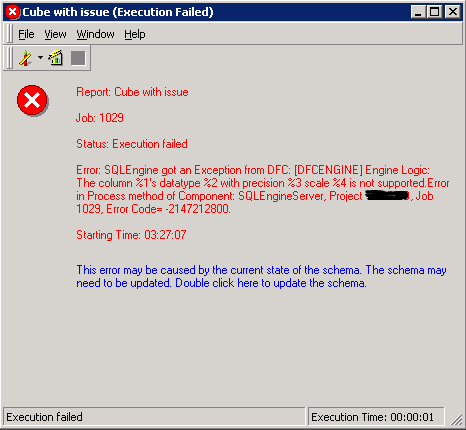
Error “SQLEngine got an Exception from DFC: [DFCENGINE] Engine Logic: The column %1's datataype %2 with precision %3 scale %4 is not supported.” occurred when trying to execute a report or cube using specific table in MicroStrategy 10.x

SYMPTOM
Error “SQLEngine got an Exception from DFC: [DFCENGINE] Engine Logic: The column %1's datataype %2 with precision %3 scale %4 is not supported.” occurred when trying to execute a report or cube using specific table in Strategy 10.x
ka04W000001Iv9TQAS_0EM44000000YUL3.png

 
There are many reasons which might trigger below error and some other related KB can be found:
For the scenario in this KB, multiple phenomena among listed below might be observed:

  1. Issue might happen suddenly even if the report/cube has been normally used before and there is no change on the definition recently.
  2. It happens to all reports or cubes related to specific table. Others can be executed successfully.
  3. Schema update could not solve this issue.
  4. It might happen to one upper level environment only, e.g. only Production environment has the issue while Development environment works fine.


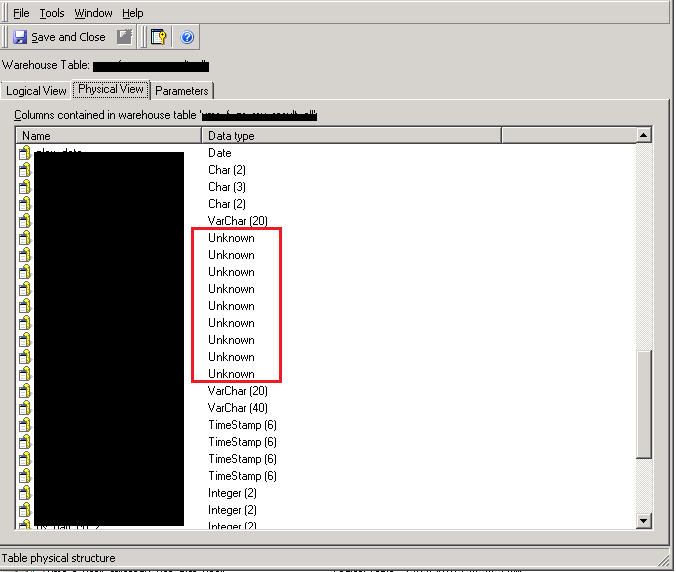
If users meet this issue and especially confirm above phenomenon 2, the unknown datatype might be found when this table definition is checked.
ka04W000001Iv9TQAS_0EM44000000YUL8.png

 
CAUSE
It is not clear why the data type for certain column becomes unknown even if the table definition is not modified.
But if the data type becomes unknown, it is expected that the schema error would happen as SQL engine is not able to resolve it.
ACTION
According to the situation, try either of below to solve this issue after backing up the metadata:

  1. Recover the metadata to the version before the issue happens.
  2. If above phenomenon 4 is confirmed, import the table package from lower level environment(Development environment) again with “Force replace” rules.
    ※Please confirm the source table and target table has the same GUID before taking this action.
  3. If this happens to single environment or Developer environment, try to refresh the table structure from Warehouse catalog.

439766


Comment

0 comments

Details

Knowledge Article

Published:

February 26, 2018

Last Updated:

February 26, 2018