EducationSoftwareStrategy.com
StrategyCommunity

Knowledge Base

Product

Community

Knowledge Base

TopicsBrowse ArticlesDeveloper Zone

Product

Download SoftwareProduct DocumentationSecurity Hub

Education

Tutorial VideosSolution GalleryEducation courses

Community

GuidelinesGrandmastersEvents
x_social-icon_white.svglinkedin_social-icon_white.svg
Strategy logoCommunity

© Strategy Inc. All Rights Reserved.

LegalTerms of UsePrivacy Policy
  1. Home
  2. Topics

KB439769: Web preferences that are changed via Command Manger script is not getting applied in MicroStrategy Web


Community Admin

• Strategy


This issue has been classified as a defect by MicroStrategy. The impact is limited to MicroStrategy Web and where a user changes the Web preference via Command Manger and does not see the change applied in MicroStrategy Web.

Symptom

Strategy Web Preferences can be changed in Strategy Web and Strategy Command Manager. However, users in Strategy will notice that changing “Default grid style” in Command Manager does not apply the change in Strategy Web. After checking Web Preferences in Command Manager using the following script, the user confirms that the preference was changed successfully:
LIST ALL WEBPREFERENCES IN PROJECT "XXXXX";   
 
However, this does not match what users see from checking the Strategy Web Preferences through the Strategy Web interface.

 

Steps to reproduce

  1. In Strategy Web 9.x and 10.x, check the Web Preferences for a project under Project Level --> “Default grid Style”. The image below shows that the style set to “Corporate”.

ka04W000000OcqYQAS_0EM44000000YUVX.gif


  1. Open Command Manager and run the following script to change the style to “Accounting”, using the following Command Manager script:

 
APPLY WEBPREFERENCES NAME "Default grid style:" VALUE "Accounting" TO PROJECT "Strategy Tutorial";
 

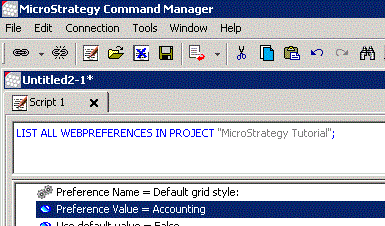
  1. Run the following script in Command Manager to make sure the change was applied successfully:

 
LIST ALL WEBPREFERENCES IN PROJECT "Strategy Tutorial";
 

ka04W000000OcqYQAS_0EM44000000YUVc.gif
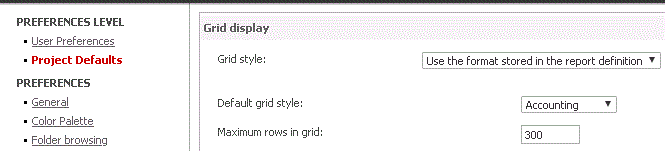
  1.  Open Strategy Web and notice that “Default grid style” is still set to “Corporate”.
ka04W000000OcqYQAS_0EM44000000YUVm.gif


Cause

This issue specifically affects Strategy 9.4.1 and 10.4 and users who are attempting to change the Web Preferences via Command Manager.
 

Action

Currently, this issue is not scoped to be addressed for any upcoming scheduled Strategy release. Consider using the workarounds listed in this article.
 

Workaround

  1. Change the Web Preferences in Strategy Web, not in Strategy Command Manager.
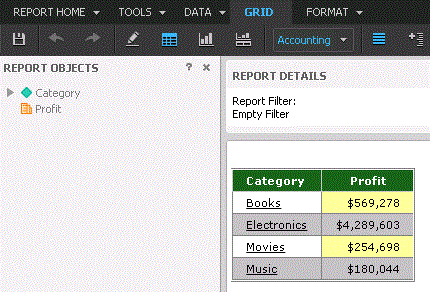
  2. If for any reason, the Web preferences have to be changed via Command Manager, please restart Web Server. The following image shows the “Default grid style” set to “Accounting” as was expected:
ka04W000000OcqYQAS_0EM44000000YUW6.gif
ka04W000000OcqYQAS_0EM44000000YUWB.gif


Comment

0 comments

Details

Knowledge Article

Published:

February 26, 2018

Last Updated:

January 4, 2019