EducationSoftwareStrategy.com
StrategyCommunity

Knowledge Base

Product

Community

Knowledge Base

TopicsBrowse ArticlesDeveloper Zone

Product

Download SoftwareProduct DocumentationSecurity Hub

Education

Tutorial VideosSolution GalleryEducation courses

Community

GuidelinesGrandmastersEvents
x_social-icon_white.svglinkedin_social-icon_white.svg
Strategy logoCommunity

© Strategy Inc. All Rights Reserved.

LegalTerms of UsePrivacy Policy
  1. Home
  2. Topics

KB439797: Is it possible to update multiple records to Salesforce with MicroStrategy XQuery Transaction 10.x?


Tianfeng (Jimmy) Jiang

Quality Engineer, Principal • MicroStrategy


This Knowledge Base article shows how to update multiple records to Salesforce with MicroStrategy XQuery Transaction 10.x

QUESTION
Is it possible to update multiple records to Salesforce with Strategy XQuery Transaction 10.x?
ANSWER
Yes. The following Salesforce SOAP API document states update call is used to update one or more existing records, such as accounts or contacts, in  organization’s data:
https://developer.salesforce.com/docs/atlas.en-us.api.meta/api/sforce_api_calls_update.htm
So, Strategy transaction document supports updating multiple existing records in Salesforce with XQuery. 
STEPS
  • Follow KB39222: How to configure MicroStrategy 9.x/10.x to write data back to Salesforce.com using Transaction Report to configure Strategy transaction document which could update records in Salesforce with XQuery.
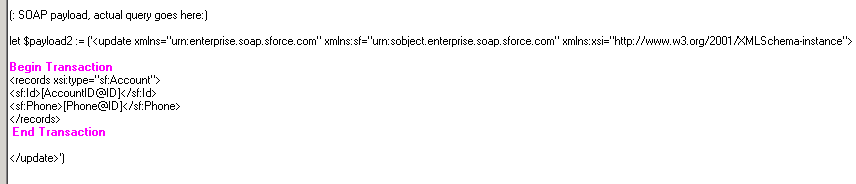
  • Set proper transaction section in transaction report so that multiple records could be updated. For example, the following transaction report supports updating multiple rows:
        
ka044000000kPYTAA2_0EM44000000YV9m.png
  •  
    
    (: SOAP payload, actual query goes here:)
    
    let $payload2 := ('<update xmlns="urn:enterprise.soap.sforce.com" xmlns:sf="urn:sobject.enterprise.soap.sforce.com" xmlns:xsi="http://www.w3.org/2001/XMLSchema-instance">
    
    [Begin Transaction]
    <records xsi:type="sf:Account">
    <sf:Id>[?TF[AccountID@ID]@@1[?</sf:Id> 
    <sf:Phone>[?TF[Phone@ID]@@2[?</sf:Phone> 
    </records>
    [End Transaction]
    
    </update>')

    The XQuery script for updating two records is as shown below:
         
ka044000000kPYTAA2_0EM44000000YV9r.png
  • 
    (: SOAP payload, actual query goes here:)
    let $payload2 := ('<update xmlns="urn:enterprise.soap.sforce.com" xmlns:sf="urn:sobject.enterprise.soap.sforce.com" xmlns:xsi="http://www.w3.org/2001/XMLSchema-instance">
    <records xsi:type="sf:Account">
    <sf:Id>0011N00001CGxVKQA1</sf:Id> 
    <sf:Phone>1111</sf:Phone> 
    </records>
     
    <records xsi:type="sf:Account">
    <sf:Id>0011N00001CH2X4QAL</sf:Id> 
    <sf:Phone>12345</sf:Phone> 
    </records>
     
    </update>')


KB439797 KB439797


Comment

0 comments

Details

Knowledge Article

Published:

March 1, 2018

Last Updated:

December 31, 2018