EducationSoftwareStrategy.com
StrategyCommunity

Knowledge Base

Product

Community

Knowledge Base

TopicsBrowse ArticlesDeveloper Zone

Product

Download SoftwareProduct DocumentationSecurity Hub

Education

Tutorial VideosSolution GalleryEducation courses

Community

GuidelinesGrandmastersEvents
x_social-icon_white.svglinkedin_social-icon_white.svg
Strategy logoCommunity

© Strategy Inc. All Rights Reserved.

LegalTerms of UsePrivacy Policy
  1. Home
  2. Topics

KB439814: Quick Symbols (Arrows) look different between Internet Explorer and Chrome in MicroStrategy Web


Community Admin

• Strategy


This article describes about a difference in quick symbol for "Arrow" between IE and Chrome when using Advanced Threshold Formatting on grid in MicroStrategy Web.

SYMPTOM:
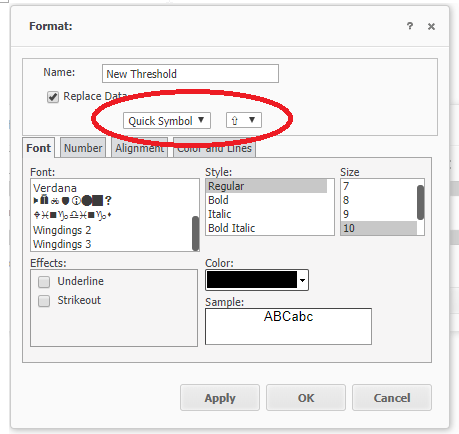
In Internet Explorer, a quick symbol (Arrow) is fulfilled with color, while in Chrome it is edge of the shape and its visibility is significantly different in Advanced Threshold Formatting on grid.
Internet Explorer:
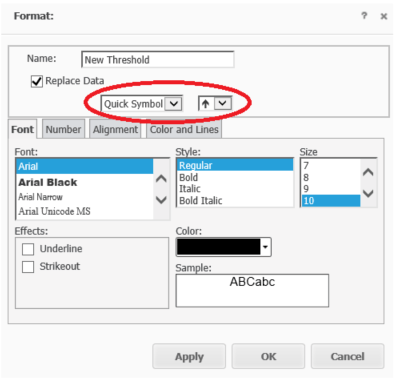
ka04W000000ObAWQA0_0EM44000000A56N.png

Chrome:

ka04W000000ObAWQA0_0EM44000000YVVs.png

STEPS TO REPRODUCE:
1. Create any blank report on Strategy Web 10.4 and above.
2. Open up the advanced threshold on grid.
3. Go to Formatting on advanced threshold.
4. Go to quick symbol, then arrow appears under drop down.
5. Between Internet Explorer and Chrome, quick symbols (arrows) look different.
WORKAROUND:
This is not something Strategy can change it since it's not Strategy code and browser dependent. It is how Chrome renders up arrow code from UTF. If need a workaround, recommend using images to display the ‘up arrow’ as you want to see it. 
The Strategy internal reference number for this article is KB439814. KB439814


Comment

0 comments

Details

Knowledge Article

Published:

March 23, 2018

Last Updated:

November 13, 2018