EducationSoftwareStrategy.com
StrategyCommunity

Knowledge Base

Product

Community

Knowledge Base

TopicsBrowse ArticlesDeveloper Zone

Product

Download SoftwareProduct DocumentationSecurity Hub

Education

Tutorial VideosSolution GalleryEducation courses

Community

GuidelinesGrandmastersEvents
x_social-icon_white.svglinkedin_social-icon_white.svg
Strategy logoCommunity

© Strategy Inc. All Rights Reserved.

LegalTerms of UsePrivacy Policy
  1. Home
  2. Topics

KB439831: Without "Create Schema Objects” privilege, user can still read VI with derived attributes created by another user but cannot save their own version of dashboard in MicroStrategy Web 10.4.


Mengran (Molly) Wang

Senior Cloud Support Engineer III • MicroStrategy


Without "Create Schema Objects” privilege, user can still read VI with derived attributes created by another user but cannot save their own version of dashboard in MicroStrategy Web 10.4.

STEPS TO REPRODUCE:
1. Create a new user with all web privileges except for "Create Schema Objects"
2. Use admin user to create a VI dashboard in web and create a new derived attribute
3. Log out and switch to the newly created user
4. Open the dashboard. Make some modifications to the dashboard, like remove one metric from grid visualization.
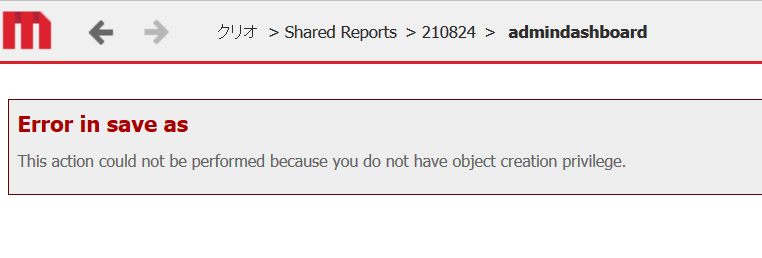
5. Try to "Save as".------- See error "The action could not be performed because you do not have object creation privilege."
ka02R000000kbAMQAY_0EM44000000YVjp.png

CAUSE:
This issue is a product defect in Strategy Web 10.4.
ACTION:
Strategy will continue to investigate and post updates as soon as they are available.
  39831


Comment

0 comments

Details

Knowledge Article

Published:

March 6, 2018

Last Updated:

March 6, 2018