SYMPTOM
When performing an update from an MMP file, some users may notice that some subscriptions missing from the "My Subscriptions" folder despite the fact they were not touched by the user.
STEPS TO REPRODUCE
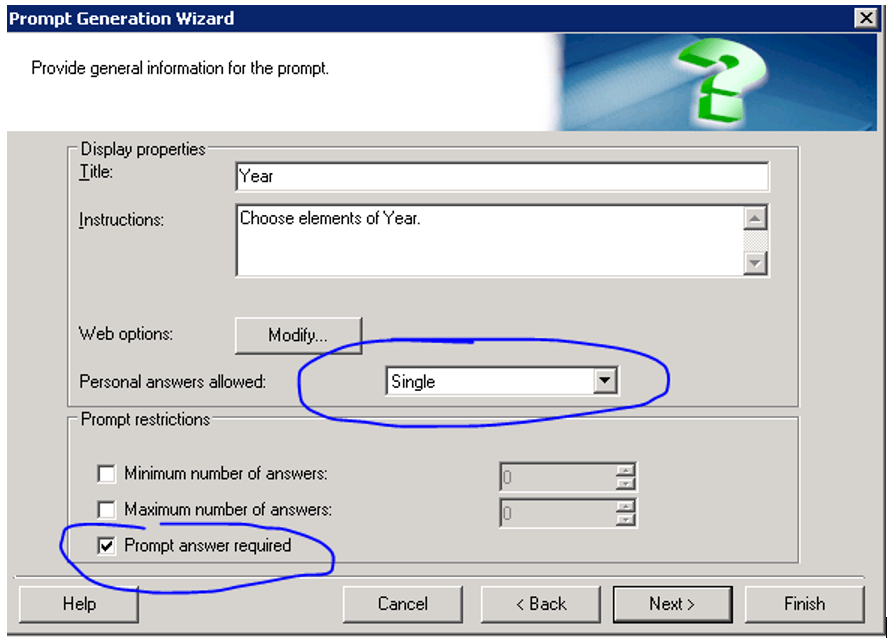
1. Create Filter1 - filter with required prompt on Year and with personal answers enabled:
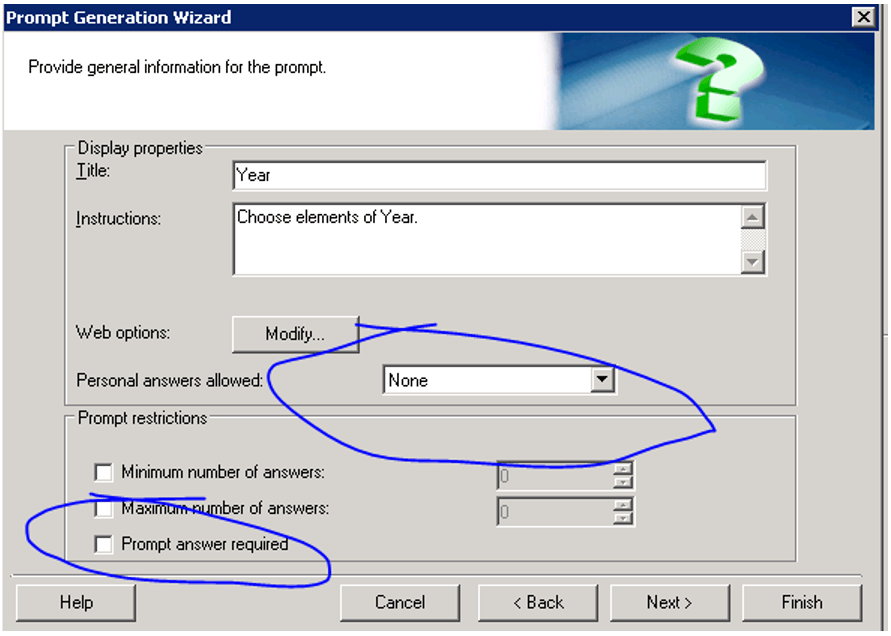
2. Create Filter2 - filter with the required prompt on Month and without personal answers enabled:
3. Create M1 - metric on fact Revenue and filtered by Filter1.
4. Create a Test Report - a report with Year, Revenue and M1.
5. Run the report and click remember the answer for prompt.
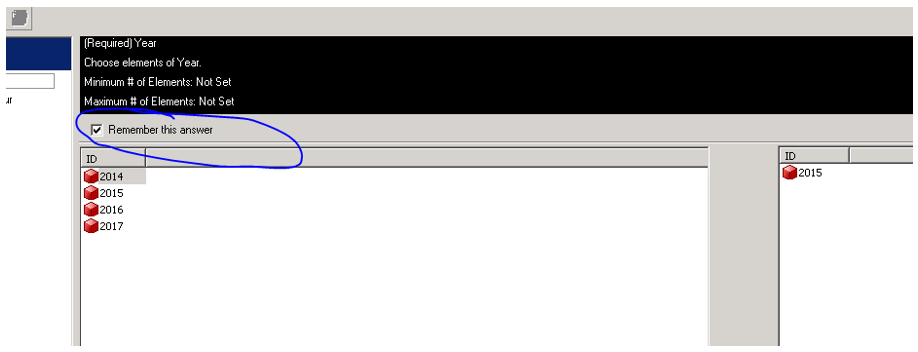
6. Then save the report without any default value for prompts:

7. Use Web to create email subscription for Test Report on event "Database Load":

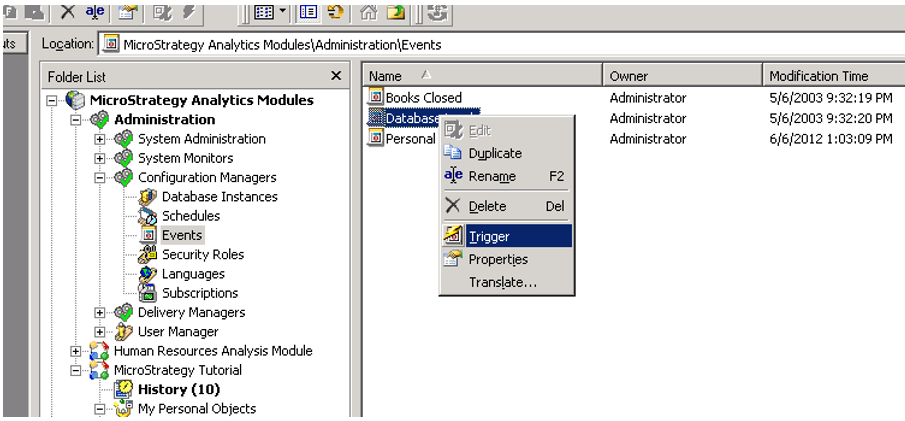
8. trigger "Database Load":
9. Email has been delivered and the subscription is still present on the subscriptions list.
10. Edit metric M1 and use Filter2 as a condition. Save.
11. Trigger "Database Load" again.
12. Subscription failed and the subscription is removed from the subscriptions list.
ACTION
This was determined to be working as per design. For our current logic, we would set the subscription status to invalid if no required prompt answer is provided
WORKAROUND
For the case, if you turn on the failure email notification in Developer, you would receive the email:
Dear Administrator:
The following Email delivery was not successful.
Delivery/update and destination information:
Run at: 7/3/2017 3:33:50 AM
Recipient name: Administrator
Email address: qiliu@Strategy.com
Error message: (The user is required to specify an answer for this prompt. The prompt's designer specified that the prompt must be answered but did not supply a default answer.Error in Process method of Component: ResolutionServer, Project Strategy Tutorial, Job 715, Error Code= -2147217091.)

Subscription Information

Subscription Name: DE66516 7/3/17 3    :29:51 AM
Created by: Administrator
Report/Document name: DE66516
Project name: Strategy Tutorial
Schedule: On Database Load
2017-07-03 03:33:50.085 [HOST:VS15NEE][SERVER:CastorServer][PID:8640][THR:6536][Distribution Service][Error] FAILED SUBSCRIPTION 'DE66516 7/3/17 3 :29:51 AM': Error Msg: MSIJob Execution Error: Job ID = 715, Comp Error code = -2147217091; Error Code 0x800437FD. Instance ID = E87C47FF4CF84D6423FC85812F898197, Contact (Administrator, 54F3D26011D2896560009A8E67019608), User (Administrator, 54F3D26011D2896560009A8E67019608). Stop in 'MSIDeliveryEngine::PreTransmissionNotification, Delivery Component of Distribution Service' <Scheduler Execution ID = 7BEFD9994166DBE967415A993E9718F0>

2. Check the subscription status every less than 24 hours in DBQuery tool (Screenshot attached). But the invalid subscription (Status =0) would be removed from MD table forever in 24 hours.
For this case in the tutorial, the easiest way to avoid the issue is to set Filter2 with no required prompt answer in step2.
KB439834
